
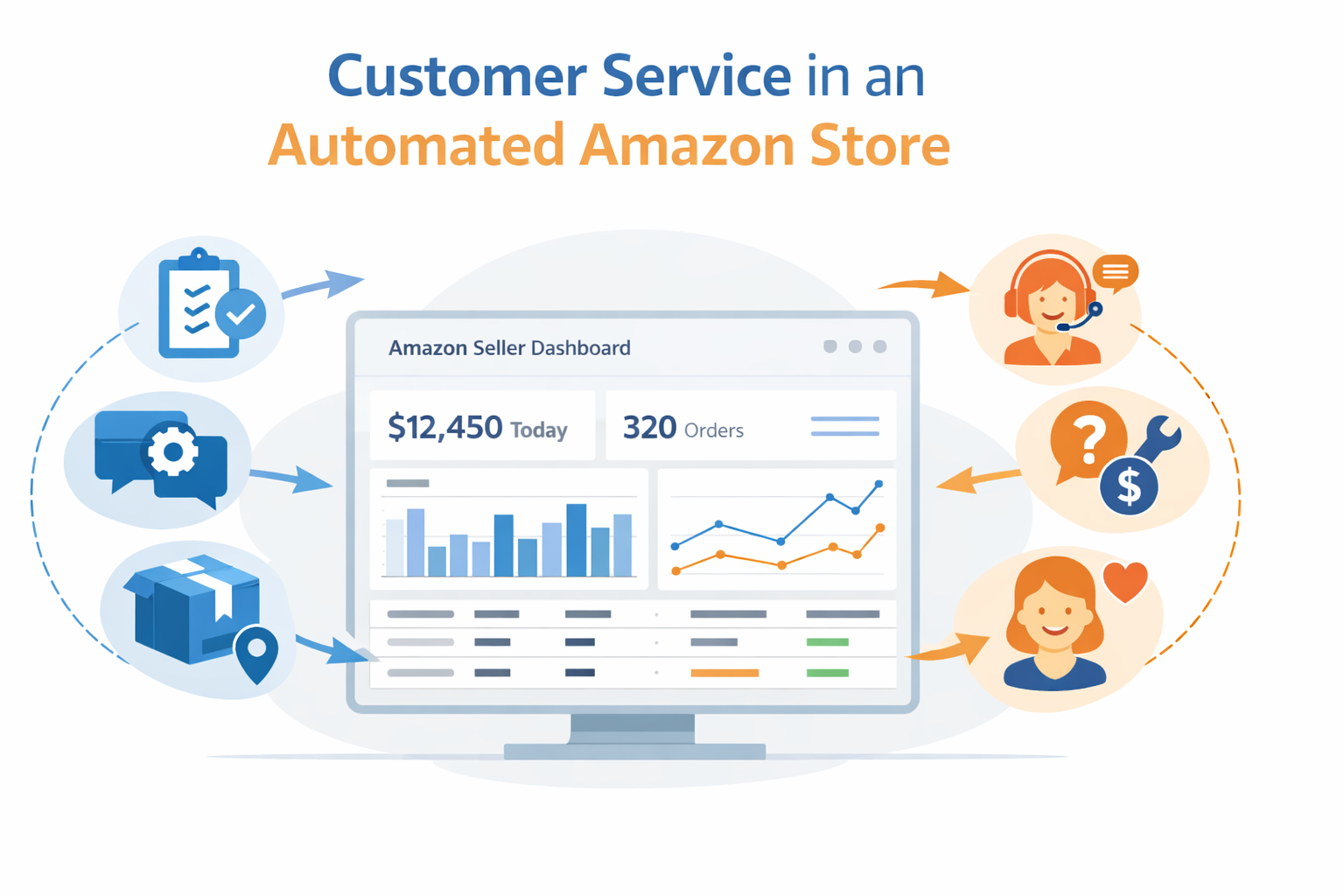
How to Handle Customer Service in an Automated Amazon Store
Customer service in an automated Amazon store often looks like a contradiction at first. If your store runs on automation, shouldn’t support handle itself? Not quite.
A 2023 Salesforce survey published on Statista found that over 60% of customers prefer automated service for simple issues, while nearly 60% still expect a real person when they reach out directly. This creates a real challenge for Amazon sellers: how do you keep things fast and automated without making customers feel ignored?
A strong support system is what separates growing stores from struggling ones. It builds trust, brings shoppers back, and turns unhappy buyers into loyal fans. Automation handles the heavy lifting, but the personal touch defines the overall customer experience. With the right setup, both work together without friction.
At HiSellIt, we help sellers build automated Amazon businesses that scale efficiently without sacrificing customer experience.
What Is Customer Service in an Automated Amazon Store?
Customer service in an automated Amazon store combines automation tools and human support to handle buyer inquiries, returns, and issues efficiently. Automation manages routine tasks like tracking and FAQs, while human agents handle complex or sensitive situations.
- Automation handles 70–80% of support
- FBA manages logistics and returns
- Human support handles escalations
- Fast response improves account health
Why Handling Customer Support in Amazon Automation Matters More Than Ever
Running an automated Amazon store might feel hands-off, but customer expectations have only gone up. Shoppers want fast answers, accurate updates, and real help when something goes wrong. They want order status, clear instructions for damaged items, and easy access to support. Automation does not change those expectations.
The good news is you now have tools that can meet those demands without burning out your team. Your Amazon store can run through structured fulfillment systems, smart messaging tools, and pre-written responses that handle common concerns before they turn into complaints. Platforms like Amazon Seller Central and FBA help sellers automate most of their communication while maintaining consistent quality. Choosing the right products also reduces customer complaints and returns. If you are still deciding what to sell, explore our guide to profitable Amazon FBA product categories to avoid common mistakes early on.
Think of your support system as having three layers. The first handles fully automated actions: order confirmations, tracking updates, and shipping notifications sent instantly. The second covers semi-automated replies for common questions about sizes, colors, or delivery times. The third brings in real human support for complex situations that need empathy and judgment.
Setting Up the Best Customer Service Systems for Your Amazon Store
Good customer service starts before a buyer even hits purchase. Start with your product listings. Clear titles, detailed descriptions, and accurate information reduce confusion from the start. Shoppers who understand what they are buying are far less likely to request returns, which directly helps your account health. To build a strong automation system, you also need the right tools. Check out our complete guide to Amazon seller tools to optimize every part of your business.
Amazon has built-in tools that handle everyday questions automatically. Set up auto-replies for common topics: shipping updates, return instructions, and product details. These messages need to sound natural, not robotic. A well-written automated reply might say something like, “Thank you for checking on your order. It is on its way and should arrive by the expected date. Track your package using this link.” That feels genuine, provides clarity, and saves time.
Success with automated replies also depends on how well you configure Fulfillment by Amazon. When inventory runs through FBA, Amazon handles packaging, shipping, and returns. This cuts down on the number of questions customers need to ask, freeing your team to focus on communication instead of operations.
Implementing Amazon Seller Central Customer Service Automation
Amazon Seller Central has automation features that many sellers never fully use. You can set up buyer-seller messaging templates for the situations that come up most often. Here are some good ones to start with:
- Order confirmation with estimated delivery
- Shipping delay notifications
- Return authorization instructions
- Product care and warranty information
- Follow-up satisfaction surveys
These templates keep your communication consistent and fast. Review and update them regularly based on what customers are asking. According to McKinsey research on AI-enabled customer service, AI-powered support can improve customer satisfaction scores by 15 to 20% while reducing operational costs by up to 20 to 30%.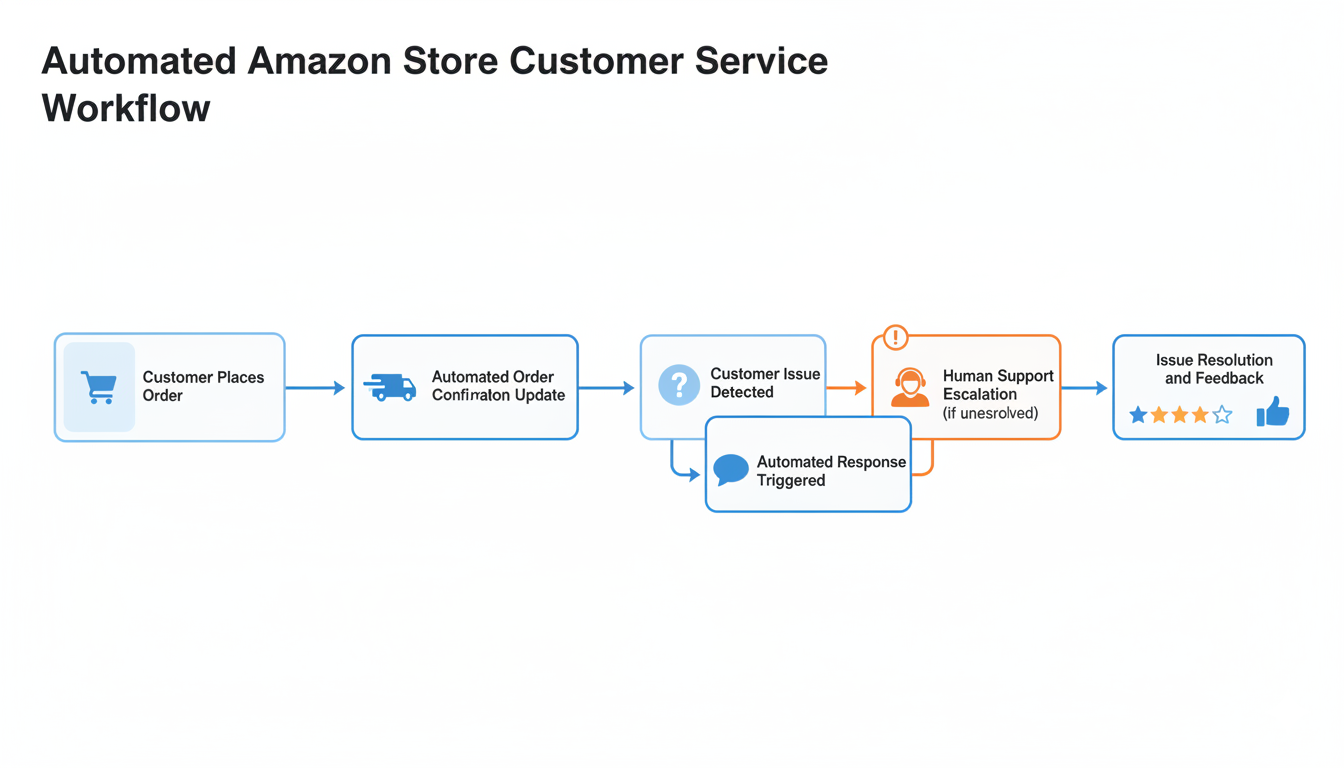
Managing Returns and Refunds in Automated Amazon Stores
Even with advanced automation, real issues always emerge in customer service in an automated Amazon store. Packages go missing, items arrive damaged, or buyers change their minds. How you handle these determines whether your handling customer support in Amazon automation thrives or struggles. Strong systems and quick, thoughtful communication separate professional operations from those losing customers over preventable issues.
For damaged goods, prioritize simplicity when managing returns and refunds in automated Amazon stores. Create a clear process allowing customers to request returns or refunds directly within your automated system. If the system can’t resolve their issue within two interactions, route the conversation to human support immediately. Most shoppers want problems solved quickly, not lengthy explanations. Keeping processes short and transparent prevents frustration and builds trust in your Amazon automation customer support.
Shipping delays need a different approach in customer service in an automated Amazon store. Being proactive saves you from negative reviews. If a shipment is delayed, send an automated message: “We noticed your order hasn’t arrived yet. Our team has started investigating with the carrier and will update you within 48 hours.” This calms concerns and shows attentiveness in your automated Amazon store customer service. Link to your Amazon shipping help page so customers know what to expect.
Returns often cause automated stores to lose momentum in their Amazon store automation customer service. Keep the return process extremely easy. The simpler the returns are, the less likely buyers are to leave negative feedback. Complicated or slow return systems turn small problems into major frustrations. A “no questions asked” return policy within reasonable timeframes may cost more upfront, but protects your reputation and increases repeat purchases when handling customer support in Amazon automation.
When to Use Virtual Assistant for Amazon Customer Service
Times always arise when automation cannot replace human care in customer service in an automated Amazon store. Customers facing serious problems, writing negative reviews, or requesting custom products need direct, empathetic communication. This is where outsourcing customer service for Amazon automation becomes valuable. Find skilled professionals on platforms like Upwork who handle complex issues efficiently in your Amazon automation customer support.
A well-trained virtual assistant for Amazon customer service manages 50 to 100 inquiries daily with structured systems. Their focus should be tasks automation can’t manage: investigating missing packages, processing complex returns, or responding to feedback requiring judgment and empathy in your automated Amazon store customer service.
Ready to expand your support system while improving fulfillment? Our Amazon FBA automation services help you manage growth with greater ease and reliability while maintaining excellent customer service in an automated Amazon store.
Train representatives to take ownership and think like customers when handling customer support in Amazon automation. Sometimes a $20 refund is smarter than letting a negative review harm long-term sales. Empower your team to make these decisions without approval each time. That freedom creates faster resolutions and more positive brand experiences overall in your Amazon store automation customer service.
Balancing Automation and Human Support on Amazon
The key to effective automated Amazon store support management lies in knowing when to escalate. Establish clear escalation triggers for customer service in an automated Amazon store:
- Customer contacts support three or more times about the same issue
- Negative language or threats to leave reviews
- Orders exceeding specific dollar amounts
- Custom requests or bulk order inquiries
- Account-related concerns or payment issues
This balanced approach to automation and human support on Amazon ensures that Amazon automation customer support remains efficient yet personal. According to Gartner research, businesses using hybrid support models see 23% higher satisfaction ratings than those relying solely on automation. This proves that the best customer service systems for Amazon automation work best with human oversight in customer service in an automated Amazon store.
Leveraging Data to Improve Automated Amazon Store Customer Service
Every customer interaction provides valuable insight into how Amazon store automation customer service performs. Each message, review, or complaint reveals where customers feel satisfied or confused in your customer service in an automated Amazon store. If you receive similar questions about shipping times, your product listings need clearer delivery information. Frequent sizing questions indicate you should create size charts. A sudden increase in damage complaints might point to packaging issues needing immediate attention in your Amazon automation customer support.
Many Amazon store owners overlook this data and respond reactively in their automated Amazon store customer service. The most successful sellers use these patterns to fix issues before they grow. Regularly check your Amazon Seller Central reports to identify recurring questions, track the percentage of orders with customer messages, and compare return rates to category averages. This data-driven approach refines automated Amazon store customer service, making every interaction smoother.
Key Metrics for Amazon Automation Customer Support
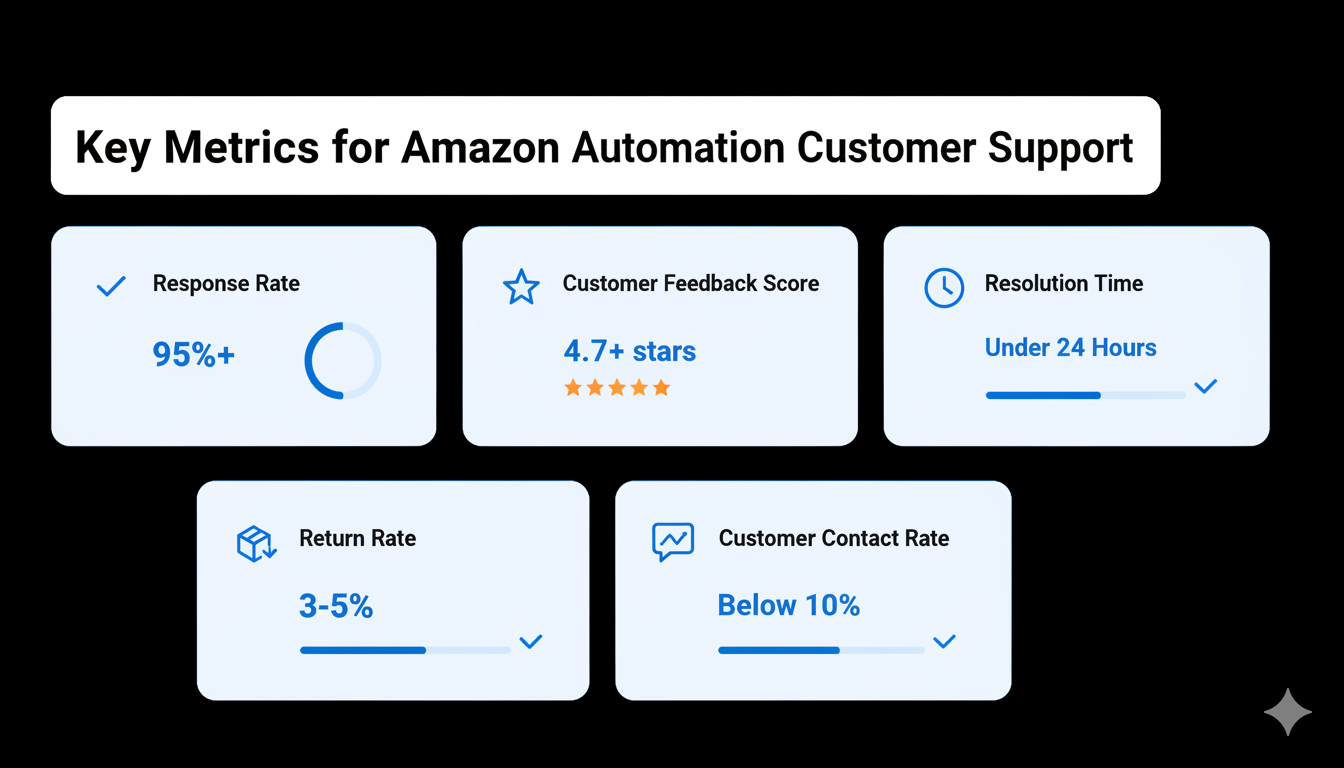
Monitor these critical metrics to ensure your customer service in an automated Amazon store performs optimally:
Response Rate: Maintain above 95% to stay in Amazon’s good graces when handling customer support in Amazon automation. Late responses trigger account health warnings and can affect Buy Box eligibility.
Customer Feedback Score: Target ratings above 4.7 stars in your Amazon store automation customer service. Lower scores signal problems in your Amazon FBA customer service automation that need immediate attention.
Return Rate: Keep within 3-5% of your product category average when managing returns and refunds in automated Amazon stores. Significantly higher rates indicate listing inaccuracies or quality issues.
Resolution Time: Aim to resolve 80% of issues within 24 hours in your customer service in an automated Amazon store. Quick resolutions prevent escalation and negative reviews.
Contact Rate: Track the percentage of orders generating customer messages. High contact rates (above 10%) suggest unclear listings or fulfillment problems that affect handling customer support in Amazon automation.
Use tools like Helium 10 or Seller App to track these metrics and identify trends in your Amazon automation customer support performance.
AI-Powered Customer Service in 2026
AI is changing the way sellers manage customer service on Amazon. In 2026, advanced tools can detect what a customer actually wants, predict issues before they happen, and respond instantly with human-like accuracy.
Modern AI tools can:
- Automatically answer repetitive questions
- Detect negative sentiment in messages
- Suggest replies for faster resolution
- Personalize responses based on order history
Sellers using AI-powered systems report:
- Faster response times
- Lower support workload
- Higher customer satisfaction
That said, AI works best when combined with human support in complex or sensitive situations. Think of it as your first line of defense, not your entire team.
Maintaining Customer Satisfaction During Peak Seasons
Busy shopping periods like holidays and major sales events test even the strongest systems for customer service in an automated Amazon store. During high-volume times, the best customer service systems for Amazon automation become your best ally. Set clear expectations in product listings well in advance. Inform shoppers that shipping may take longer, and responses could be delayed. Most customers are patient with transparency when managing customer service in an automated Amazon store.
Expand automated systems during these times by creating short, friendly FAQ messages covering common topics in your Amazon automation customer support. Add an FAQ section directly to your Amazon storefront and set up prewritten replies for frequent questions about delivery, returns, or gift packaging. If hiring extra support for the season, train temporary staff ahead of the rush. Well-trained assistants keep operations steady; unprepared ones create more confusion in your Amazon store automation customer service.
Seasonal Strategies for Amazon Store Automation Customer Service
Prepare your customer service in an automated Amazon store for peak seasons with these strategies:
Pre-Season Preparation: Review the previous year’s data to identify common issues in your automated Amazon store customer service. Update automated responses accordingly. Test all systems under simulated high-volume conditions for your Amazon automation customer support.
Clear Communication: Update all listings with realistic shipping timeframes. Add banners to your storefront about potential delays in your customer service. Send proactive emails to customers with extended delivery windows as part of your automated Amazon store customer service.
Increased Capacity: Whether scaling with a virtual assistant or temporary hires for customer service in an automated Amazon store, ensure coverage matches volume. Consider time zone differences if selling internationally for your Amazon store automation customer service.
Post-Purchase Engagement: Send automated follow-up messages thanking customers and providing tracking information in your Amazon automation customer support. This reduces anxiety-driven support contacts in your Amazon FBA customer service automation.
Return Window Extensions: Consider extending return windows during holidays when managing returns and refunds in automated Amazon stores. This gesture builds goodwill and often results in fewer actual returns, as customers feel less rushed.
These practices in an automated Amazon store help maintain service quality when it matters most during peak seasons for your Amazon automation customer support.
How Amazon FBA Handles Customer Service Integration
Understanding customer service in an automated Amazon store requires knowing FBA’s role in Amazon FBA customer service management. When using Fulfillment by Amazon, the platform handles significant customer service aspects automatically. FBA manages shipping inquiries, return processing, and refund issuance for most standard situations. This integration is central to customer service and your Amazon automation customer support.
However, FBA doesn’t eliminate your customer service responsibilities in your automated Amazon store customer service. You still handle pre-purchase questions, product-specific inquiries, and feedback management. The Amazon buyer messaging system remains your primary communication tool for these interactions in your Amazon automation customer support.
Best practices for integrating FBA with your customer service in an automated Amazon store include:
Unified Communication: Monitor both Seller Central messages and Amazon buyer-seller messaging consistently in your Amazon store automation customer service. Set up mobile notifications to catch urgent issues quickly.
Clear Handoffs: Make it obvious to customers which issues Amazon handles (shipping, returns) versus what requires contacting you (product questions, customization) in your customer service in an automated Amazon store.
Proactive Monitoring: Watch FBA inventory levels closely for your automated Amazon store customer service. Out-of-stock situations create customer service issues. Use automated alerts to prevent stockouts in your Amazon automation customer support.
Quality Control: Inspect returned inventory promptly when managing returns and refunds in automated Amazon stores. Patterns in returns often indicate listing problems or product defects needing attention in your handling of customer support in Amazon automation.
Performance Tracking: Review your seller feedback management Amazon reports weekly. Look for trends in negative feedback related to FBA fulfillment in your customer service in an automated Amazon store.
This integration creates seamless automated Amazon store customer service while leveraging FBA’s infrastructure advantages for your Amazon automation customer support.
Can You Automate Amazon Customer Service Fully?
A common question is: Can Amazon customer service be fully automated? The short answer is no, but you can get remarkably close for routine interactions in customer service in an automated Amazon store. Modern customer support tools for automated Amazon stores handle 70-80% of inquiries without human intervention. The remaining 20-30% requires human judgment, empathy, and problem-solving in your Amazon automation customer support.
Technology continues to advance. AI chatbots and machine learning improve automated responses for Amazon customers daily. However, complex situations, emotional customers, and unique circumstances still demand human touch in your automated Amazon store customer service. The goal isn’t eliminating humans but optimizing their involvement for maximum impact in customer service.
Consider this approach to customer service in an automated Amazon store:
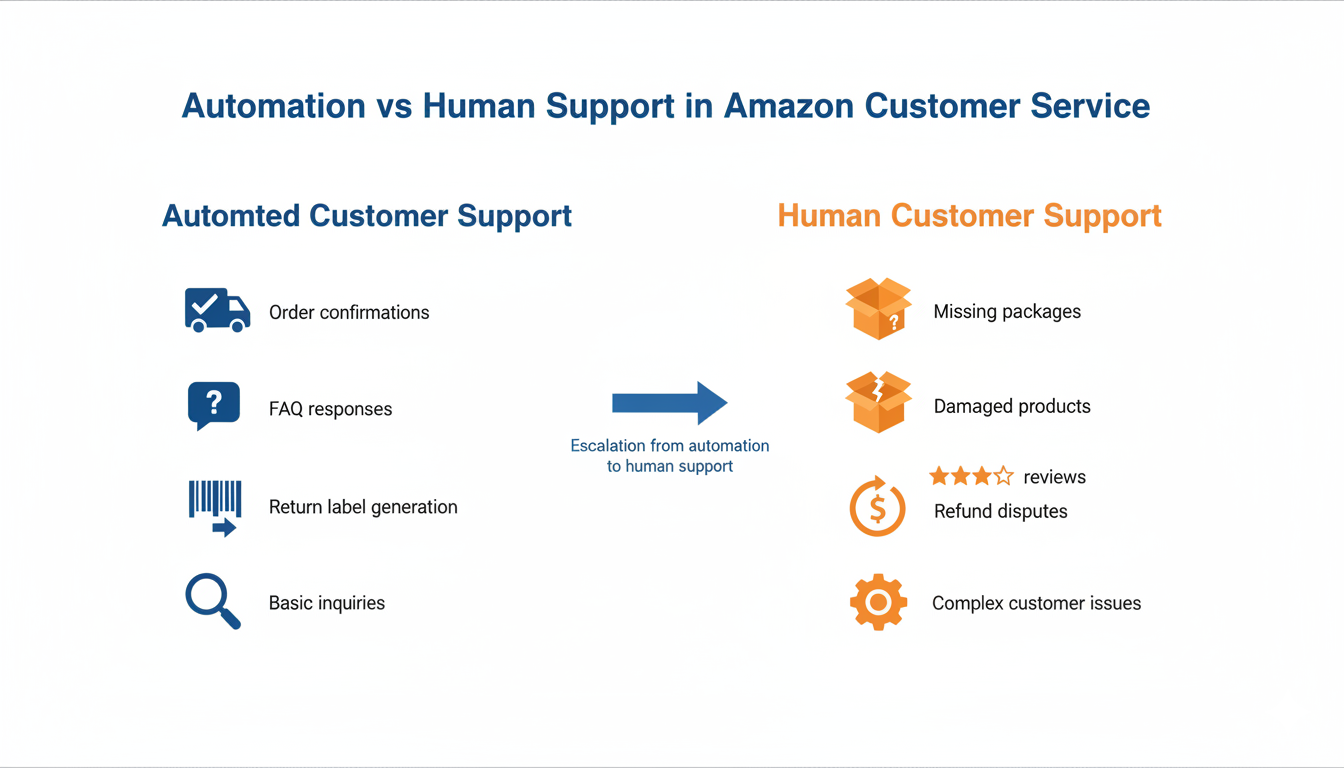
Tier 1 (100% Automated): Order confirmations, tracking updates, shipping notifications, basic FAQ responses, and return label generation in your Amazon store automation customer service.
Tier 2 (Semi-Automated): Common questions with templated responses requiring minor customization, routine return approvals, and standard refund processing in your Amazon automation customer support.
Tier 3 (Human-Required): Complex problems, negative review responses, custom requests, account issues, legal concerns, escalated complaints when handling customer support in Amazon automation.
Structuring your customer service this way maximizes efficiency while maintaining quality. According to McKinsey research, this tiered approach reduces support costs by 30% while improving satisfaction scores by 15% in Amazon automation customer support.
How Much Customer Service Can Be Automated on Amazon?
Most Amazon sellers can automate 70–80% of customer service using tools, templates, and FBA systems. The remaining 20–30% requires human support for complex issues, complaints, and customer satisfaction.
- Automate tracking, confirmations, and FAQs
- Use templates for common questions
- Escalate complex issues to human support
- Balance automation with personalized responses
Customer Service Challenges in Automated Amazon Stores
Running customer service in an automated Amazon store isn’t without challenges. Understanding these helps you prepare and build better systems for handling customer support in Amazon automation and your Amazon store automation customer service.
Challenge 1: Maintaining Personal Touch at Scale
As order volume grows, maintaining individual attention becomes harder in customer service in an automated Amazon store. Solution: Use personalization tokens in automated messages (customer name, specific product, order number) for your automated Amazon store customer service. These small touches make automation feel more human in your Amazon automation customer support.
Challenge 2: Language and Cultural Barriers
Selling internationally means serving diverse customers in your automated Amazon store.
Solution: Offer automated responses for Amazon customers in multiple languages. Tools like Amazon’s built-in translation features help, but consider hiring multilingual support for complex issues in your Amazon store automation customer service.
Challenge 3: Platform Policy Changes
Amazon frequently updates policies affecting Amazon seller customer experience requirements.
Solution: Subscribe to Seller Central announcements and join communities like SellerCentral forums to stay informed about customer service in an automated Amazon store. Adjust your Amazon automation customer support systems promptly.
Challenge 4: Technology Limitations
Automation tools sometimes fail or provide incorrect information in your automated Amazon store customer service. Solution: Regularly audit automated responses for Amazon customers. Include fallback options directing customers to human support when automation fails in your Amazon automation customer support.
Challenge 5: Balancing Speed and Quality
Fast responses are crucial, but rushed, unhelpful replies frustrate customers in your customer service in an automated Amazon store. Solution: Develop comprehensive templates covering scenarios thoroughly for your Amazon store automation customer service. Test templates with real customers before full deployment in your automated Amazon store customer service.
These customer service challenges in automated Amazon stores require ongoing attention when handling customer support in Amazon automation. Successful sellers view challenges as opportunities to refine their customer service in an automated Amazon store continuously.
Common Customer Service Mistakes in Automated Amazon Stores
Avoid these mistakes to protect your account health and your customer satisfaction scores:
- Over-automating responses (sounds robotic and impersonal)
- Ignoring negative reviews
- Slow response times (hurts account health directly)
- Complicated return processes
- No escalation system for complex issues
Fixing even one or two of these can instantly improve your ratings and conversions. It is worth auditing your current setup against this list.
According to a 2024 Gartner survey, only 14% of customer service issues are fully resolved through self-service alone. This is exactly why avoiding these common mistakes and building in proper escalation paths is so important.
Best Tools for Amazon Customer Service Automation
The right tools make automation reliable and scalable. Here are the top ones worth using:
- Seller Central: Amazon’s built-in messaging system. Free, integrated, and the foundation of your support setup. Access it directly from your Amazon Seller Central dashboard.
- Zendesk: A comprehensive support platform with Amazon integration. Great for teams managing high volumes. Learn more at zendesk.com.
- Gorgias: Built for e-commerce with strong automation features. A popular choice for Amazon and multi-channel sellers. Explore it at gorgias.com.
- FeedbackWhiz: Automates review requests and monitors seller feedback. Keeps your reputation management on autopilot. Check it out at feedbackwhiz.com.
When choosing tools, focus on how well they integrate with your existing systems. The best tool is the one your team actually uses consistently.
For comprehensive support that includes these tools and expert management, explore managed Amazon automation services at HiSellIt.
Done-for-You Amazon Store Customer Service Solutions
Some sellers prefer a fully managed approach rather than building systems from scratch. This works well for those scaling quickly or who do not have time to run customer service personally. If you are looking for a hands-off approach, explore our Amazon Wholesale FBA service designed to handle sourcing, automation, and customer support for you.
Benefits of going with a managed service:
- Expertise: Agencies that specialize in Amazon automation have already solved problems you have not encountered yet.
- Scalability: Professional services scale support up or down based on demand. No need to hire and fire full-time staff around seasons.
- Technology Access: Managed services often include premium tools as part of the package. No separate subscriptions or integration headaches.
- Reduced Learning Curve: Skip the trial and error. Proven templates and processes get implemented right away.
- Cost Efficiency: While the upfront cost looks higher, managed services often cost less than hiring, training, and retaining in-house staff.
Consider managed services when your monthly order volume exceeds 500 units, customer service takes more than 15 hours per week, you are expanding to international markets, or you want to stay focused on growth and product sourcing.
Order Tracking Automation: Amazon Best Practices
Order tracking questions are one of the most common customer inquiries sellers face. Proactive updates keep buyers informed without requiring them to reach out.
- Immediate Confirmation: Send an order confirmation within minutes of purchase. Include the estimated delivery date and tracking link once available.
- Shipping Updates: Notify customers when items ship. Include carrier info and a tracking link. Set clear delivery expectations.
- In-Transit Notifications: For longer shipping windows, a mid-transit message like “Your order is on schedule for delivery by [date]” reduces anxiety.
- Delivery Confirmation: Send a final confirmation when the item is delivered. Include a thank-you message and an optional review request.
- Exception Handling: Automatically notify customers of delays, routing changes, or missed delivery attempts. Give them the next steps and a contact option.
These practices reduce “Where is my order?” messages by up to 60%. Tools like AfterShip or TrackingMore integrate with Amazon and handle these notifications automatically for most sellers at under $30 per month.
Amazon Returns and Refunds Automation Strategy
Returns are part of selling on Amazon. Efficient processing is what keeps your metrics healthy and your customers satisfied.
- Auto-Approval for Qualifying Returns: Set parameters for automatic return authorization. Returns within 30 days for undamaged items under a specific value can approve themselves.
- Clear Return Instructions: Provide step-by-step guidance in your automated messages. Customers should know what to pack, where to send it, and when to expect a refund.
- Return Label Generation: Automate label creation and delivery. Customers should not have to request a label separately.
- Refund Processing: Set up automatic refunds upon return receipt. Speed here prevents negative feedback and builds trust.
- Restocking Procedures: Create automated workflows for returned inventory inspection. Do not let returned items sit.
- Data Collection: Track return reasons systematically. Patterns here reveal product issues, listing inaccuracies, or shipping problems.
Amazon monitors return dissatisfaction rates closely. Efficient return systems keep this metric healthy. For FBA sellers, Amazon handles most logistics, but you still control your return policies and should monitor rates through Seller Central returns reports.
Amazon Account Health and Customer Service Connection
Your account health is directly tied to how well your support system performs. Amazon tracks several metrics that affect your standing:
- Order Defect Rate (ODR): Must stay below 1%. Strong support keeps this minimal.
- Late Shipment Rate: FBA sellers avoid this automatically. Merchant-fulfilled sellers need to monitor it carefully.
- Pre-Fulfillment Cancel Rate: High rates signal inventory problems. Good support means accurate listings and stock management.
- Contact Response Time: Amazon expects 24-hour response times. Automation makes hitting this threshold easy.
- Valid Tracking Rate: Should exceed 95%. Automated tracking systems maintain this without manual effort.
Poor metrics trigger reviews or suspensions. Monitor your Amazon account health dashboard at least once a week. If Amazon sends a notification, respond immediately with a clear plan showing how you will prevent the issue from recurring.
Building a Sustainable Amazon Seller Customer Experience
According to McKinsey research, 71% of consumers expect personalized interactions, and 76% get frustrated when they do not receive them. This applies directly to how you write automated messages and follow-ups.
- Continuous Improvement: Review customer feedback every month. Fix root causes instead of just symptoms.
- Customer Lifetime Value Focus: Acquiring a new customer costs 5 to 7 times more than keeping an existing one. Excellent support drives repeat purchases.
- Brand Consistency: Every customer touchpoint should reflect your brand values, from automated messages to live conversations.
- Proactive Communication: Do not wait for problems. Send helpful tips after purchase. Share product care instructions. Check in on satisfaction.
- Feedback Loops: Let customer service insights inform your product selection, listing optimization, and business strategy.
- Employee Satisfaction: Happy support staff provide better service. Treat virtual assistants and team members well. Offer fair pay and growth opportunities.
Cost Analysis: Customer Service Investment for Amazon Automation
Understanding what good support costs help you budget with confidence. Most sellers find that investing 3 to 5% of revenue in their support system delivers strong returns through better metrics, fewer suspensions, and more repeat purchases.
If you are planning your budget, read our detailed breakdown of Amazon FBA automation costs to understand what to expect when scaling your store.
Key cost categories to plan for:
- Virtual Assistants: $10 to $25 per hour for flexible, scalable support.
- Automation Tools: $20 to $300 per month, depending on how many platforms you use.
- Managed Services: $500 to $5,000 per month for full-service support, depending on order volume.
The return on that investment comes from reduced negative reviews, higher repeat purchase rates, and the protection of your account health.
Conclusion: Mastering Customer Service in an Automated Amazon Store
Good customer service in an automated Amazon store comes down to balance. Automation takes administrative weight off your plate, freeing you to focus on the customers who actually need your attention. The most successful sellers do not pick between automation and human care. They blend both in a way that anticipates problems and stays available when it counts.
Start simple. Set up clear product descriptions, automated replies for common questions, and reliable fulfillment through FBA. Watch your metrics, let customer feedback guide your improvements, and scale your support team gradually as order volume grows. Treat automation as something that amplifies great service, not something that replaces it.
Customers do not care whether tracking updates come from a bot or a human. They care that the information shows up fast and solves their problem. They care that when something goes wrong, someone fixes it. Build your support system around that principle, and you will build a business that grows sustainably with customers who keep coming back.
Ready to scale your Amazon store with expert support? Contact our team today and let us help you build a fully automated system that keeps customers happy and your business growing.
Frequently Asked Questions
Q. What does customer service in an automated Amazon store actually involve?
It involves a hybrid approach where automated systems handle routine tasks like order confirmations and tracking updates, while trained staff or virtual assistants manage complex issues, returns, and complaints. The goal is to automate 70 to 80% of interactions while keeping humans available for situations that need real judgment.
Q. How much does it cost to hire customer service support for an Amazon store?
Virtual assistants from platforms like Upwork typically cost $10 to $25 per hour, giving you flexibility to scale based on volume. Full-time in-house representatives run $25,000 to $40,000 annually, depending on location and business size.
Q. What’s the best way to handle negative reviews from customer service issues?
Respond professionally and quickly, ideally within 24 to 48 hours. Acknowledge the frustration, take responsibility where warranted, and offer a specific solution, such as a refund, replacement, or credit. This shows potential buyers that you take feedback seriously.
Q. Can I run an automated Amazon store with zero customer support?
Technically, Amazon’s automation and FBA services mean some orders are processed without direct involvement, but neglecting customer service entirely hurts your business. Customers always have questions or encounter issues. Ignoring them leads to negative reviews, Amazon account warnings, and lost repeat business. Invest at least part-time support into your automated Amazon store customer service.
Q. How can I verify that my customer service system is functioning properly?
Monitor seller metrics in Amazon Seller Central, especially response rate, feedback score, and return rate. Healthy automated Amazon stores maintain response rates above 95%, feedback scores above 4.7 stars, and return rates within 3-5% of product category averages. Below these benchmarks indicates your customer service in an automated Amazon store needs adjusting.
Q. What tools are essential for Amazon automation customer support?
Essential tools include Amazon Seller Central’s built-in messaging, feedback management platforms such as Feedback Genius, customer service platforms such as Zendesk or Freshdesk, and review monitoring tools. The specific combination depends on your volume and complexity, but most successful automated Amazon stores use at least 2 or 3 integrated tools.
Q. How do I balance automation and human support on Amazon effectively?
Create a tiered system in which automation handles routine inquiries (tracking, basic returns, FAQs), semi-automation handles common questions with templated responses, and human support addresses complex issues, emotional customers, and unique situations. This approach optimizes handling customer support in Amazon automation by maximizing efficiency while maintaining quality.
Q. Should I outsource customer service for Amazon automation or hire in-house?
It depends on your volume, budget, and growth plans. Outsourcing to virtual assistants works well for sellers processing 200 to 1,000 orders monthly. In-house teams offer better control and product knowledge for larger operations. Many sellers start with VAs and move to a hybrid model as they scale.
Need help optimizing your automated Amazon store for better service and sales? Contact our team today to start building a system balancing automation with genuine customer care.