
YouTube Automation in 2026: Business Model, Costs, Niches & Profit Potential
What Is YouTube Automation?
YouTube automation is a business model where a channel owner builds and operates a YouTube channel by outsourcing
content creation tasks such as scripting, editing, voiceovers, and thumbnails. Instead of appearing on camera, the
owner focuses on niche strategy, analytics, and monetization while a team handles production.
In 2026, this model will have matured. It is not a secret anymore, and it is not a guaranteed money machine either. But for people who treat it like a real business, it still produces strong results. This guide covers everything you need to know: how it works, what it costs, which niches perform best, the legal side of things, and honest answers about profitability.
If you want expert help setting up your channel or building out a team, HiSellIt offers YouTube automation services built around your goals.
What Is YouTube Automation and How Does It Work?
Think of it as running a media company rather than being a YouTuber. You are the business owner. Your team creates the content.
YouTube’s own creator documentation makes clear that channels are not required to be run by a single individual. Many successful channels are built and managed by teams, which is exactly what YouTube automation formalizes as a business structure.
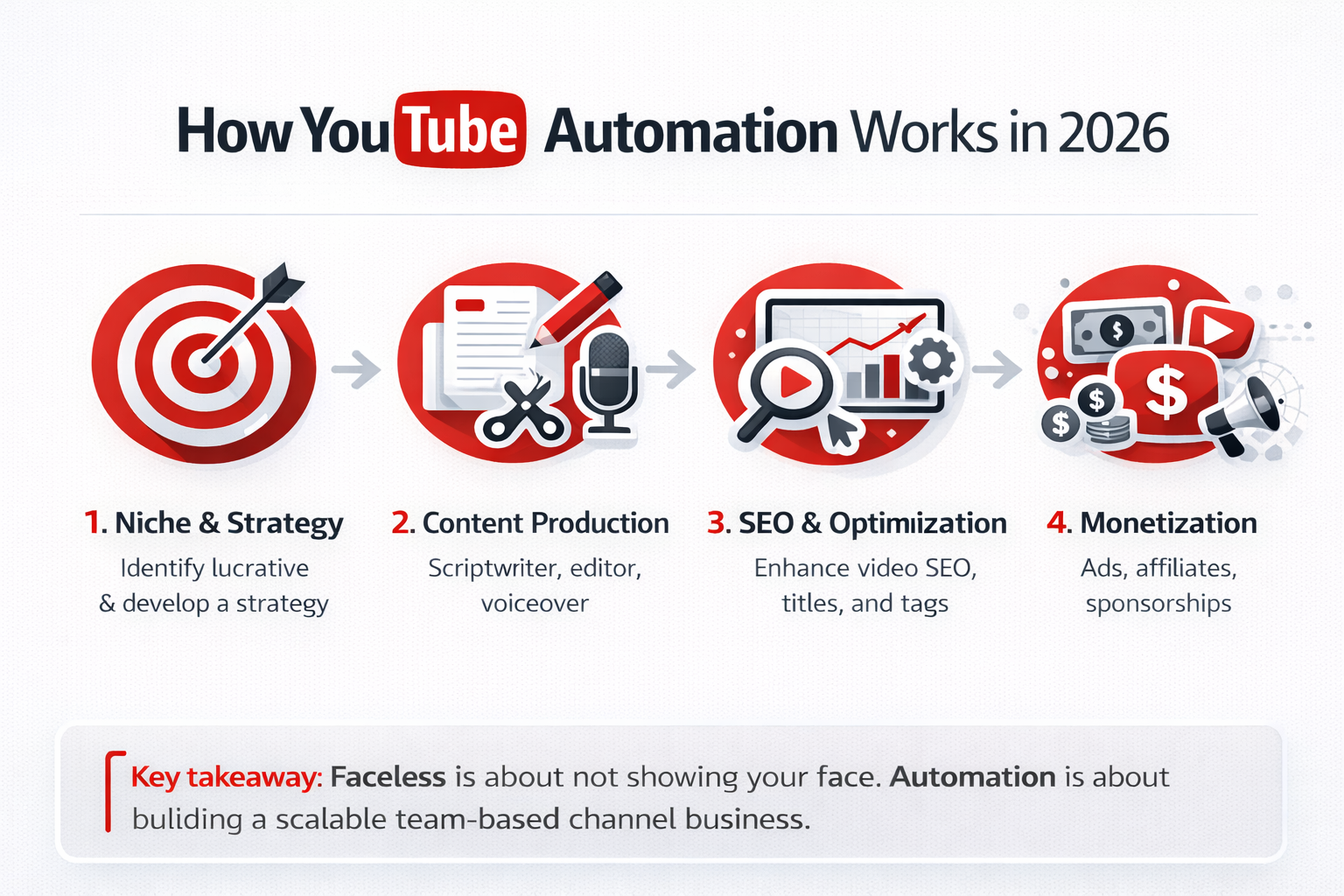
A typical YouTube automation channel has four working parts:
- Strategy and planning: You choose the niche, research topics, track performance, and make key decisions.
- Content production: Freelance scriptwriters, video editors, voiceover artists, and thumbnail designers handle all creative work.
- SEO and optimization: Keywords, titles, descriptions, and tags are handled to help videos rank.
- Monetization: Ad revenue, affiliate links, brand deals, and digital products all bring in income.
You are not a content creator in the traditional sense. You are a channel operator. That distinction matters a lot when it comes to sustainability and scale.
YouTube Automation 2025 vs 2026: What Changed?
The YouTube automation space in 2025 was still finding its feet. AI tools were newer, competition was building, and many channels were copying each other. In 2026, a few things have shifted:
- AI voiceovers and video generation have improved significantly. The gap between AI-created content and human-produced content has narrowed.
- YouTube’s Creator channel has consistently highlighted a shift toward rewarding meaningful engagement signals like comments, saves, and shares, not just watch time.
- Channels with consistent publishing schedules are still being rewarded, but quality now matters more than raw volume.
- Monetization requirements remain unchanged: 1,000 subscribers and 4,000 watch hours to join the YouTube Partner Program.
- Niche competition has increased in personal finance and tech. Emerging niches like AI education, longevity content, and regional channels now offer better opportunities for new entrants.
The fundamentals have not changed. But the bar for quality has gone up, and the people winning in 2026 are those who treat this like a proper business from day one.
Is YouTube Automation Still Profitable in 2026?
Is YouTube Automation Still Profitable in 2026?
Yes, YouTube automation can still be profitable in 2026, especially in higher-RPM niches like finance, tech, and
health. Results depend on content quality, consistency, and niche competition. Most channels need 6–12 months of
steady publishing before returns become meaningful.
Yes, but not automatically. Profitability depends on your niche, your team quality, your publishing consistency, and your patience.
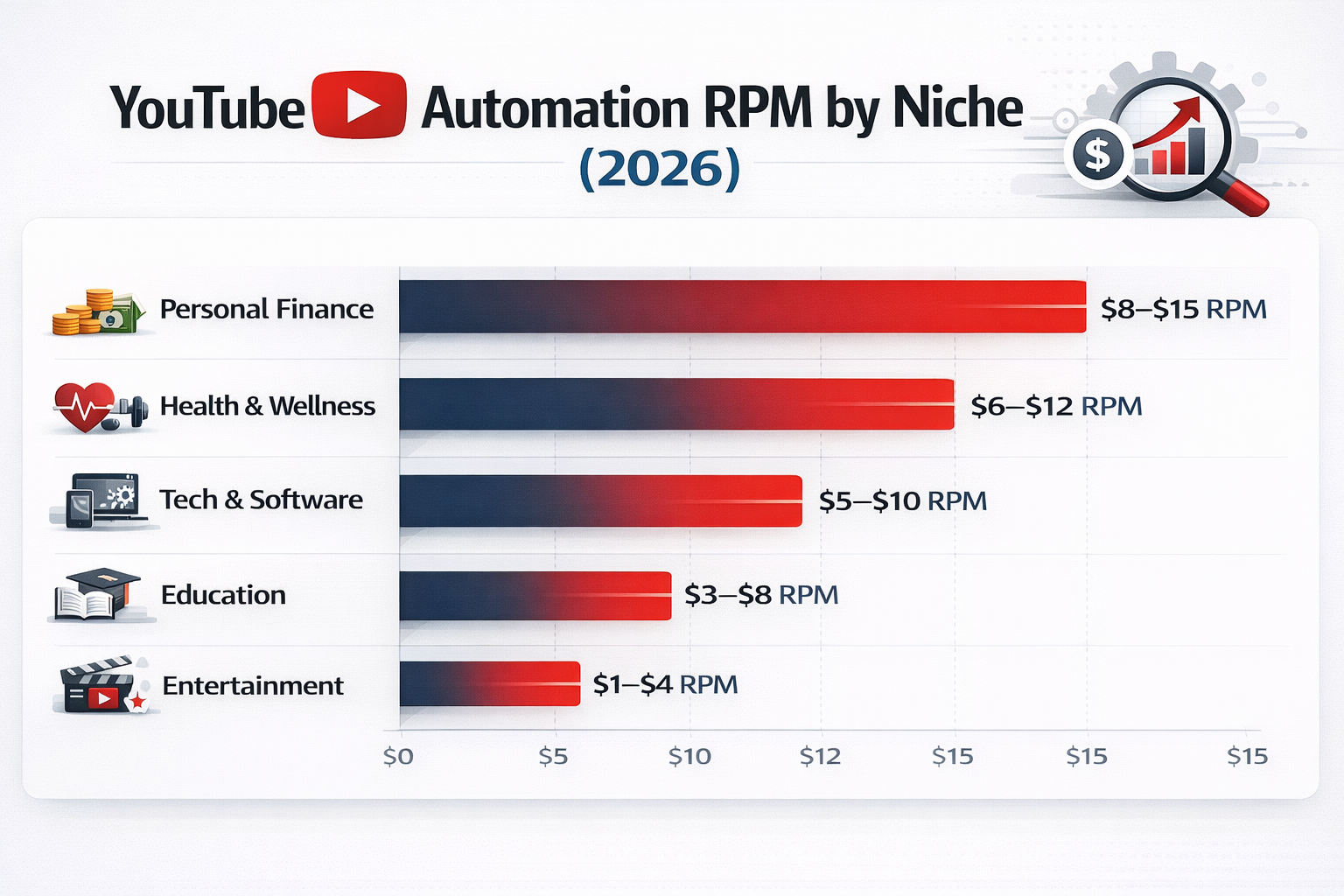
YouTube’s RPM documentation confirms that earnings vary widely by niche, advertiser demand, and audience geography. Here is a realistic look at what channels typically earn through ad revenue:
| Niche | Typical RPM |
| Personal finance and investing | $8 to $15 per 1,000 views |
| Health and wellness | $6 to $12 per 1,000 views |
| Technology and software | $5 to $10 per 1,000 views |
| Education and skill building | $3 to $8 per 1,000 views |
| Entertainment and lifestyle | $1 to $4 per 1,000 views |
RPM (Revenue Per Mille) is what you actually earn after YouTube takes its cut. CPM (Cost Per Mille) is what advertisers pay before the split. According to Google AdSense support documentation, YouTube retains 45% of ad revenue and pays creators 55%. Always track RPM, not CPM, when evaluating your channel’s performance.
Simple Revenue Example: A Finance Channel at 200,000 Monthly Views
| Income Source | Monthly Estimate | Notes |
| Ad Revenue (RPM $10) | $2,000 | 200K views at $10 RPM |
| Affiliate Marketing | $800 to $1,500 | Finance product commissions |
| Sponsorships | $500 to $2,000 | 1 to 2 brand deals per month |
| Team Costs | -$1,500 to -$2,500 | Editor, writer, voiceover, designer |
| Net Monthly Profit | $1,800 to $3,000 | After expenses |
Most channels that publish consistently and invest in quality content start seeing $500 to $2,000 a month within 6 to 12 months. Reaching $5,000 or more monthly is achievable but typically takes 12 to 18 months of steady work.
How Much Does YouTube Automation Cost?
How Much Does YouTube Automation Cost?
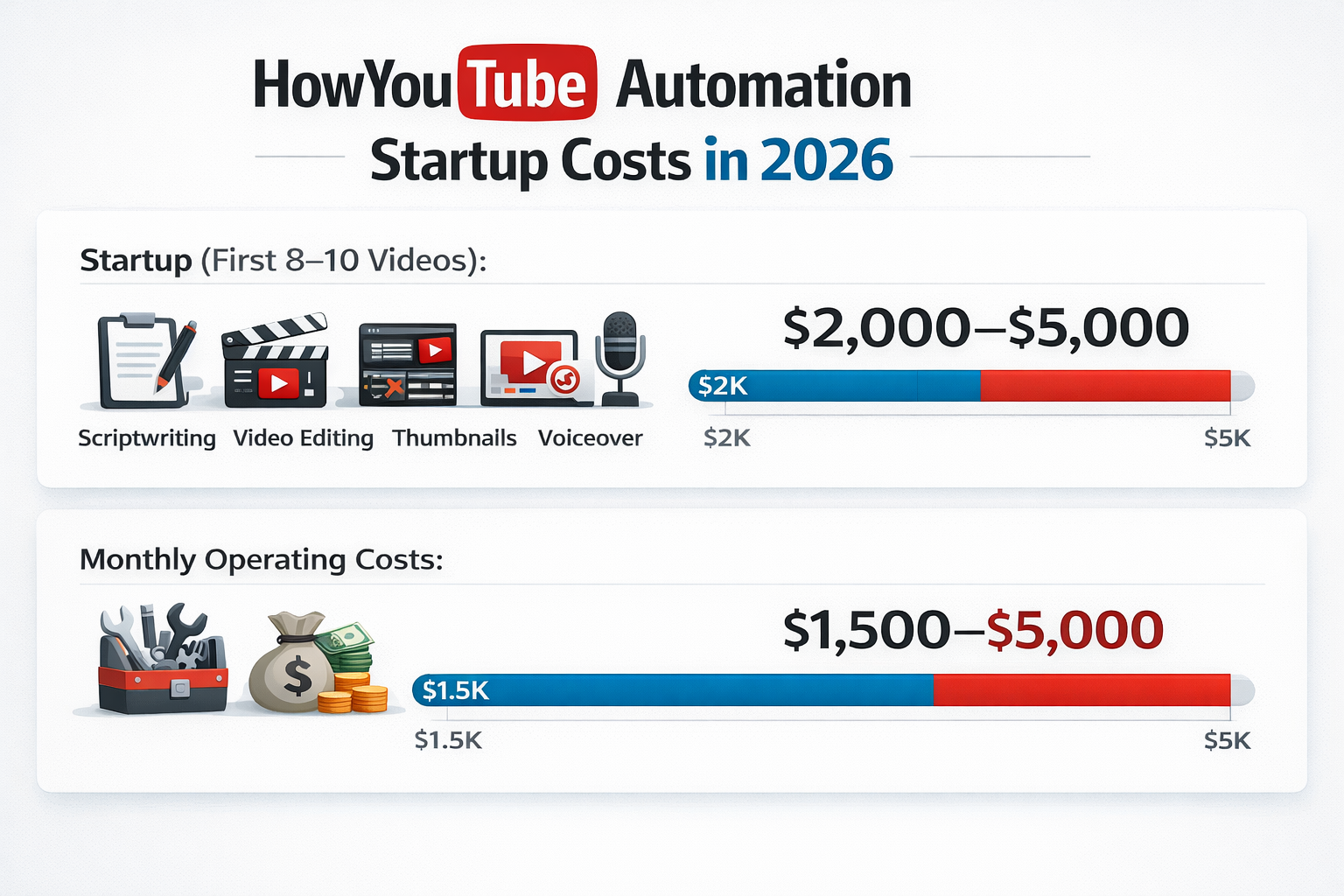
Starting a YouTube automation channel typically costs between $2,000 and $5,000 for the first
8–10 videos. Ongoing monthly costs usually range from $1,500 to $5,000, depending on team size,
publishing frequency, and production quality.
- Scriptwriting
- Video editing
- Thumbnail design
- Voiceovers
- Software tools
This is one of the most searched questions, so here is a straight answer.
Full Cost Breakdown
| Cost Item | Per Video | Monthly (8 videos) | Phase |
| Script Writing | $50 to $200 | $400 to $1,600 | Startup + Ongoing |
| Video Editing | $200 to $800 | $1,600 to $6,400 | Startup + Ongoing |
| Thumbnail Design | $25 to $100 | $200 to $800 | Startup + Ongoing |
| Voiceover | $100 to $400 | $800 to $3,200 | Startup + Ongoing |
| SEO Tools | N/A | $50 to $150 | Ongoing |
| Channel Manager | N/A | $500 to $2,000 | Scale Phase |
| Total (starter level) | $1,500 to $4,000/month | Month 1+ |
A realistic startup budget for your first 8 to 10 videos is between $2,000 and $5,000. You can start leaner, but a lower investment usually means slower growth due to lower production quality. Upwork and Fiverr are two of the most widely used platforms for finding editors, writers, and designers at competitive rates.
Best YouTube Automation Niches in 2026
Choosing the right niche is the single most important decision you will make. Pick one with enough audience demand, decent CPM, and topics you can consistently cover for years.
Tier 1: High-Earning Niches
- Personal finance and investing: Strong CPM, loyal audiences, easy to build authority over time
- Health, fitness, and mental wellness: High demand, evergreen content, strong affiliate opportunities
- Technology reviews and AI tools: Growing fast in 2026, especially content covering AI software and productivity apps
- Business and entrepreneurship: Good CPM and strong affiliate income potential
Tier 2: Growing Niches Worth Watching in 2026
- Longevity and biohacking: Gaining serious traction with a premium audience willing to spend
- AI education and tutorials: Very low competition still, with a fast-growing and engaged audience
- Personal development and productivity: Evergreen, easy to script, and wide appeal
- Regional travel and culture: Less competition than global travel content, with strong engagement rates
For a deeper look at which niches are overcrowded and which still have room, read our full guide on whether YouTube automation is saturated.
Is YouTube Automation Legal?
Is YouTube Automation Legal?
Yes, YouTube automation is legal. Hiring freelancers or using AI tools to create original content does not violate
YouTube’s terms of service. To stay compliant, use properly licensed assets, avoid reused content without meaningful
transformation, and follow disclosure rules for sponsored videos.
Yes, YouTube automation is legal. There is nothing in YouTube’s terms of service that prohibits hiring a team or using AI tools to produce content.
That said, there are rules you need to follow. YouTube’s Community Guidelines and YouTube Partner Program policies are the two key documents to understand before you monetize:
- You cannot use copyrighted music, footage, or images without a proper license. Always use royalty-free or licensed assets.
- YouTube’s reused content policy targets channels that repurpose other creators’ videos without adding meaningful value. Original content produced by your team does not fall into this category.
- Scripts, voiceovers, and edits must be original. Do not copy content directly from other channels.
- Sponsored content must be disclosed properly. The FTC Endorsement Guide covers exactly what that disclosure needs to look like.
YouTube automation channels that follow these rules operate legally and can be fully monetized without issue.
YouTube Automation vs Faceless YouTube Channel: What Is the Difference?
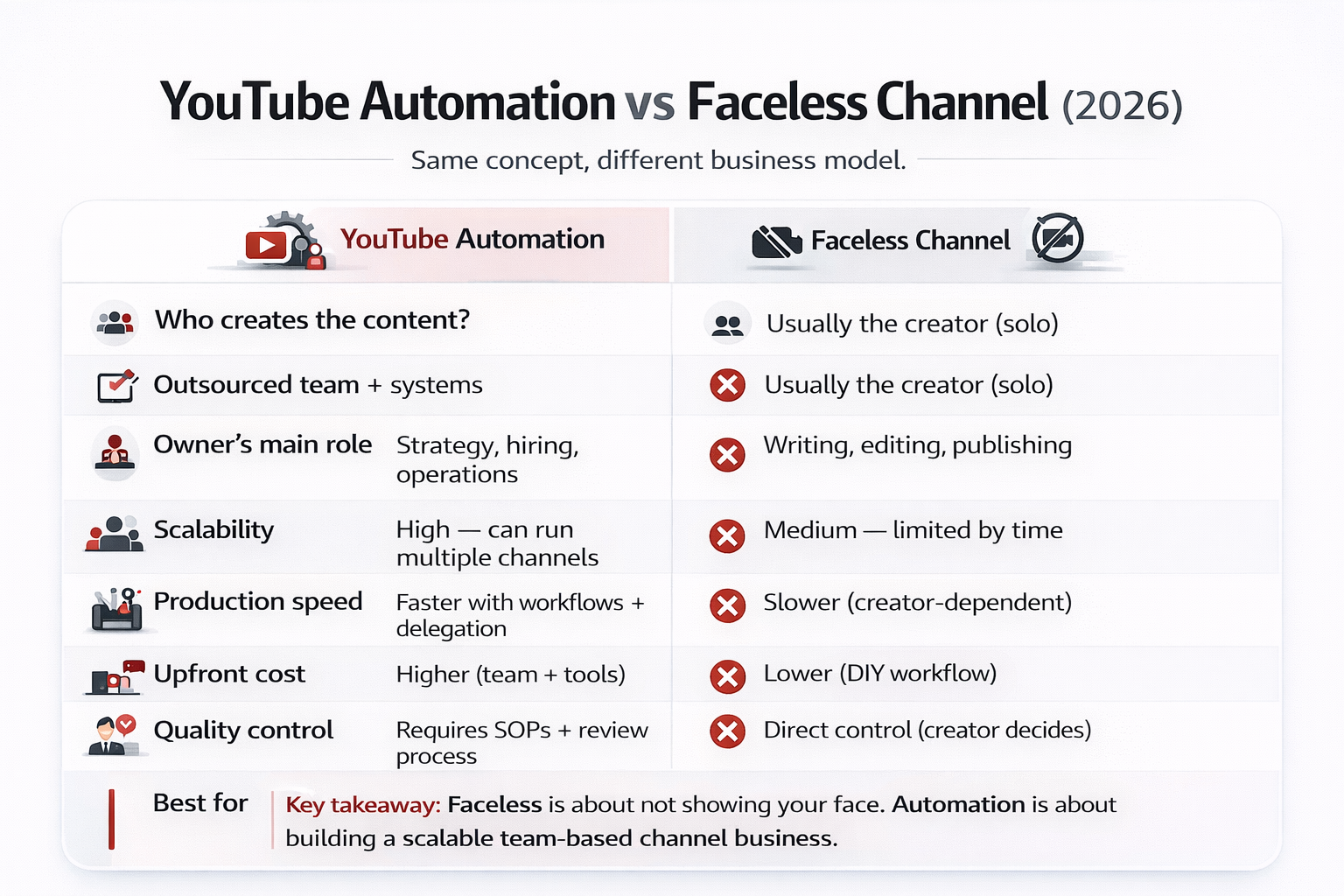
These two terms get used a lot interchangeably, but they are not the same thing. Here is how they actually compare:
| Factor | YouTube Automation | Faceless YouTube Channel |
| Who creates content | Hired a team of freelancers | Usually, the channel owner alone |
| On-camera presence | Not required | Not required |
| Owner involvement | Strategy and management only | Full creative involvement |
| Scalability | High: can run multiple channels | Low: limited by one person’s time |
| Startup cost | $2,000 to $5,000+ | $0 to $500 for tools only |
| Time to launch | 2 to 4 weeks with a team | Can start immediately |
| Best for | People building a scalable business | Solo creators who enjoy making content |
The key difference is the business model. Faceless channels are often passion projects run by one person. YouTube automation is designed to scale across multiple channels without you being the bottleneck in content production.
Building Your YouTube Automation Team
Your team is your channel. Getting the right people in place early makes everything else easier.
Core Roles
- Scriptwriter ($50 to $200 per script): Researches topics, writes engaging scripts optimized for YouTube’s format, and knows how to open a video with a strong hook
- Video editor ($200 to $800 per video): Assembles footage, adds graphics and animations, handles color and audio, and understands pacing for YouTube audiences
- Thumbnail designer ($25 to $100 per thumbnail): Creates eye-catching visuals that drive clicks and runs A/B tests to see what works in your niche
- Voiceover artist ($100 to $400 per video): Delivers clear, engaging narration that fits your brand’s tone and style
Advanced Roles for Scaling
- Channel manager ($500 to $2,000 per month): Coordinates the team, manages publishing schedules, and handles community engagement
- SEO specialist ($300 to $1,000 per month): Handles keyword research, optimizes titles and descriptions, and monitors performance trends
Start lean. For your first channel, you only need the four core roles. Upwork and Fiverr are solid starting points for finding reliable freelancers. Always run a paid test project before committing to a long-term arrangement.
Tools You Actually Need
There are dozens of tools marketed to YouTube automation creators. Most are optional. Here is what actually matters:
Content Creation
- Script writing: ChatGPT or Jasper AI for first drafts that your writer then refines
- Video editing: Adobe Premiere Pro, DaVinci Resolve (free), or Final Cut Pro
- Voiceover (AI option): ElevenLabs or Murf for channels using AI voices
- Thumbnails: Canva Pro or Adobe Photoshop
SEO and Analytics
- TubeBuddy or VidIQ for keyword research, competitor tracking, and performance monitoring
- YouTube Studio Analytics for watch time, audience retention, and revenue data
Team Management
- Notion or Trello for content calendars and workflow tracking
- Slack for team communication
You do not need to spend $500 a month on tools when you are starting out. A $50 to $100 monthly budget covers the essentials. The VidIQ blog is also a reliable free resource for staying current on YouTube SEO best practices and algorithm changes.
Common YouTube Automation Mistakes That Kill Channels
Most channels that fail do not fail because the model does not work. They fail because of avoidable mistakes. For a full breakdown of what gets channels demonetized or penalized, read our guide on YouTube automation demonetization mistakes.
- Picking a niche based on CPM alone: High-CPM niches are high-competition niches. Make sure you can actually compete before committing.
- Underpaying for quality: Cheap scripts and edits produce cheap-looking content. Watch time and engagement both drop when quality is low, and those are exactly the signals YouTube’s algorithm rewards.
- Inconsistent publishing: The algorithm rewards regular schedules. Going quiet for weeks disrupts growth momentum.
- Ignoring analytics: Your data tells you what is working. Channels that do not review performance weekly keep making the same mistakes.
- Copying other channels directly: Repurposing other creators’ content without meaningful transformation violates YouTube policy and will get your channel flagged or removed.
- Giving up too early: Most channels do not monetize in the first two to three months. That is completely normal. The channels that push through that period are the ones that eventually succeed
Is YouTube Automation Still Worth It in 2026?
For the right person, yes. But it is worth being honest about who that person is.
YouTube automation works well for people who are comfortable managing a team, making data-driven decisions, and thinking long-term. It is not a passive income shortcut. It requires upfront investment, consistent effort, and the willingness to iterate based on results.
It is probably not the right fit if you want results within 30 days, are not willing to invest in quality, or expect things to run themselves from day one.
That said, as a scalable online business model, it holds up well in 2026. Statista’s digital advertising research shows online video advertising continues to grow year over year, which directly supports the ad revenue side of this business model. Channels that get the fundamentals right are still growing steadily.
Monetization Strategies That Work in 2026
Ad revenue is the most well-known income stream, but it should not be your only one.
- YouTube Partner Program: Available once you hit 1,000 subscribers and 4,000 watch hours. Ad revenue scales with views and RPM.
- Affiliate marketing: Promote products relevant to your niche and earn commissions on sales. Works especially well in finance, tech, and health niches.
- Sponsored content: As your channel grows, brands will pay for dedicated videos or mentions. Rates vary by audience size and niche authority.
- Digital products: Courses, guides, and templates are high-margin and build naturally from an educational channel.
- Channel memberships: Available through YouTube once you qualify. Works well for channels with an engaged community.
Building multiple income streams from one channel significantly reduces risk. If YouTube adjusts ad rates or the algorithm shifts, you are not entirely dependent on one source.
How to Scale Beyond One Channel
Once your first channel is profitable and your systems are running smoothly, you can apply the same process to a second channel in a different niche.
Most people who scale successfully do it with three to five channels across complementary niches. The team structure carries over, the tools stay the same, and the lessons from channel one make channel two faster to build.
Before expanding, make sure your first channel is genuinely stable: consistent uploads, growing revenue, and a team that functions well without your daily involvement. Rushing into a second channel before the first is solid often spreads resources too thin and weakens both.
International expansion is another path worth exploring. Localizing content for Spanish, Portuguese, Hindi, and Arabic-speaking audiences often means lower competition and strong CPMs in specific niches.
Your YouTube Automation Action Plan
Phase 1: Foundation (Months 1 to 2)
- Pick your niche using research, not guesswork
- Set up your tools and create your first content calendar
- Hire your core team: writer, editor, designer, voiceover
- Publish your first 8 to 12 videos
Phase 2: Growth (Months 3 to 6)
- Publish consistently: 2 to 4 videos per week
- Review analytics weekly and adjust your content strategy based on what is working
- Apply for the YouTube Partner Program once you qualify
- Add affiliate links and start testing monetization beyond ads
Phase 3: Scale (Months 7 to 12)
- Bring in a channel manager to handle day-to-day operations
- Expand into new monetization streams
- Evaluate whether a second channel makes sense based on your current systems
- Build topical authority through consistent content in your niche
Final Thoughts
YouTube automation in 2026 is a real business model with real results for people who approach it seriously. It is not a side hustle that runs itself. It is an operation that requires upfront investment, good hiring decisions, consistent execution, and patience.
The channels winning right now are not the ones with the flashiest tools or the biggest budgets. They are the ones who picked a solid niche, built a reliable team, published consistently, and kept improving based on data.
If you are ready to build yours with support from people who have done it before, get in touch with the HiSellIt team. We can help you put together a plan that fits your goals and timeline.
You can also explore our full range of YouTube automation services or visit HiSellIt.com to see how we work.
Frequently Asked Questions
Q. How much money do I need to start a YouTube automation channel?
A realistic starting budget is $2,000 to $5,000 for your first batch of content and basic tools. You can start with less, but lower budgets usually mean slower growth due to lower content quality.
Q. How long does it take to make money?
Most channels that publish consistently qualify for monetization within 3 to 6 months. Early revenue is usually $100 to $500 per month. Reaching $2,000 or more per month typically takes 9 to 18 months of steady effort.
Q. Do I need to show my face?
No. YouTube automation channels commonly use stock footage, animations, screen recordings, AI avatars, or hired on-camera talent. Faceless channels generate significant revenue every day.
Q. Is YouTube automation legal?
Yes. Hiring a team, using AI tools, and outsourcing content creation are all permitted under YouTube’s terms of service. The content must be original, properly licensed, and compliant with YouTube’s Community Guidelines.
Q. How many videos should I upload per week?
Two to four videos per week works best for most automation channels. Three per week tends to hit the right balance between consistency and quality. Do not sacrifice quality for volume.
Q. Can I run multiple channels at once?
Yes, once you have proven systems and a reliable team. Get one channel to a stable, profitable state before launching a second. Three to five channels is a common end goal for people running this as a full business.
Q. What is the difference between RPM and CPM?
CPM is what advertisers pay per 1,000 ad impressions. RPM is what you actually receive after YouTube’s 45% share. According to YouTube’s monetization documentation, RPM is the more accurate measure of your channel’s real earnings. Always track RPM.