
Amazon Seller Central Explained: A Beginner’s Guide to the Dashboard
Amazon Seller Central is where most of the operational work of selling on Amazon happens. Once you have an Amazon seller account, this is the workspace you use to add products, monitor inventory, manage orders, review payments, check account health, run advertising, and deal with issues that need attention.
The Amazon Seller Central dashboard can feel complicated at first because it covers several parts of the business at once. You do not need to learn every report or tool immediately.
This Amazon Seller Central guide focuses on the areas that matter most to a new seller. For Amazon Seller Central for beginners, the useful questions are simple: What am I selling? Do I have stock? What has sold? Where is my money? Is my account healthy? And is there anything Amazon needs me to fix today?
What Is Amazon Seller Central?
Amazon Seller Central is the main workspace third-party sellers use to manage products, listings, inventory, shipments, orders, fulfillment, payments, advertising, reports, and account performance. It acts as the operational control center for an Amazon selling account rather than being a customer-facing storefront.
What Is Amazon Seller Central?
If you are asking what is Amazon Seller Central, think of it as the private back office behind your Amazon selling activity.
The Amazon selling platform gives sellers access to tools for catalog management, stock, orders, fulfillment, finances, customer-related issues, marketing, advertising, and compliance.
An Amazon Seller Central account is different from the product pages shoppers see. Customers browse Amazon’s marketplace. Sellers use the Amazon seller portal behind the scenes.
That is the simplest way to understand Amazon Seller Central explained for somebody who is new to the platform.
Amazon’s own seller-registration guidance describes Seller Central as the hub for a selling account, where sellers can list and price products, manage inventory, and fulfill customer orders. Read Amazon’s official seller registration and Seller Central overview.
Amazon Seller Central Dashboard Sections Explained
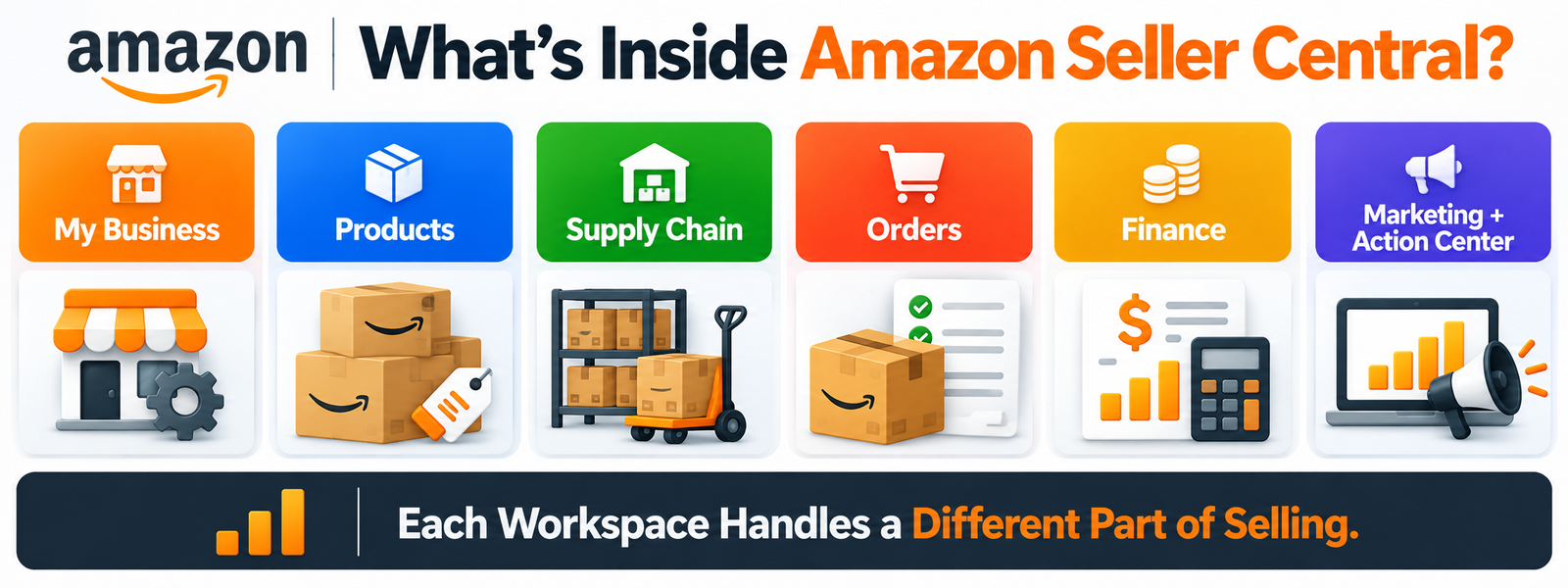 The current Amazon Seller Central navigation has been reorganized around purpose-built workspaces rather than the older menu structure shown in many tutorials.
The main Amazon Seller Central sections now include My Business, Products, Supply Chain, Orders, Finance, Customers, and Marketing. The Amazon Seller Central Action Center can surface urgent tasks across those areas.
Understanding these Amazon Seller Central features makes the dashboard much easier to navigate.
My Business
Amazon Seller Central My Business is the high-level overview.
It can bring together sales, inventory, orders, and account-health information so you can see the general state of the business without opening several detailed reports.
Think of it as the Amazon business dashboard for quick orientation.
Products
Products is where much of your Amazon catalog management happens.
This is where Amazon Seller Central products, Amazon product listings, catalog status, listing performance, ASIN-related information, and product data come together.
Supply Chain
The Supply Chain workspace focuses on inventory, shipments, storage, and fulfillment-related visibility.
For sellers using FBA, this can include Amazon FBA inventory and shipment information. It can also support broader Amazon inventory management and supply-chain monitoring.
Orders
Orders is where Amazon Seller Central orders are handled.
This is the area used for Amazon order management, order status, fulfillment-related actions, returns, and post-order issues.
Finance
Finance is where sellers review revenue, expenses, refunds, fees, balances, and payment information.
Amazon Seller Central payments and Amazon payment reports are important parts of this workspace.
Customers
The Customers workspace can surface customer-related information, policy issues, Amazon policy alerts, Amazon compliance alerts, and matters that may require seller action.
Marketing
Marketing brings together Amazon marketing tools such as promotions, discounts, and access to advertising-related functions.
Depending on eligibility and account type, Amazon Seller Central advertising can connect sellers with campaign-management tools such as Amazon Sponsored Products.
Action Center
The Amazon Seller Central Action Center cuts across the rest of the dashboard.
Instead of making you search every workspace individually, it is designed to surface time-sensitive Amazon seller tasks and Amazon Seller Central alerts that need attention.
Amazon’s announcement for the redesigned interface confirms these current workspaces and the cross-dashboard Action Center.
What Does the My Business Workspace Show?
Amazon Seller Central My Business is useful when you want a quick Amazon Seller Central overview before moving into deeper reports.
It can show a sales snapshot, orders, inventory, account health, and other high-level business information.
That makes it useful as an Amazon seller business overview, but it should not replace detailed reporting.
For example, the Amazon sales dashboard can help you understand sales activity, while inventory, payment, and account-health areas provide more specific operational information.
The practical approach is to use My Business to see what is happening, then move into the relevant detailed workspace when something needs investigation.
How Products and Listings Work in Seller Central
If you are asking where do Amazon sellers manage products, start with the Products workspace.
Amazon Seller Central products can include products you add to an existing Amazon product catalog as well as listings created for products that require new catalog information.
Amazon add products tools can help sellers find an existing product page or begin creating appropriate listing information where permitted.
Two identifiers matter early:
An ASIN identifies a product within Amazon’s catalog.
A SKU is the seller’s own identifier for a specific offer or inventory item.
Amazon listing management covers price, quantity, offer status, product data, and other listing information. Amazon catalog management deals with how products fit into Amazon’s wider shared catalog.
For a new Amazon seller, focus first on whether Amazon product listings are active and accurate. Detailed listing SEO can come later.
How Inventory and Supply Chain Tools Work
Amazon Seller Central inventory tells you what stock is available and where relevant inventory sits within your fulfillment setup.
Amazon inventory management becomes particularly important when you use FBA because products may be moving between inbound shipments, fulfillment centers, reserved states, and available stock.
The Supply Chain workspace can provide visibility into inventory, shipments, storage utilization, and related operations.
Amazon FBA inventory tools help sellers monitor stock already assigned to Fulfillment by Amazon. Amazon shipment management helps track inventory moving into the fulfillment network.
Amazon inventory reports can provide more detailed information when the dashboard alone is not enough.
Amazon also says its current Supply Chain Services can track transportation, storage, distribution, fulfillment, and delivery through Seller Central. See Amazon’s Supply Chain Services overview.
For Amazon selling for beginners, inventory tracking matters because an active listing is not very useful if the business cannot actually fulfill the order.
How to Manage Orders in Amazon Seller Central
If you are asking where do I manage Amazon orders, use the Orders workspace.
A basic workflow looks like this:
customer order → order appears → fulfillment route applies → shipment status updates → delivery or post-order issue is handled
Amazon Seller Central orders can behave differently depending on whether the item uses FBA or merchant fulfillment.
Amazon manage orders tools help sellers review current orders, shipping status, buyer-related issues, and returns where relevant.
Amazon returns management and Amazon fulfillment management should be treated as part of normal account operations rather than tasks to check only when a problem happens.
For Amazon order management, the main beginner priority is simple: know which orders Amazon is fulfilling and which ones you are responsible for shipping yourself.
FBA vs FBM: What Changes Inside Seller Central?
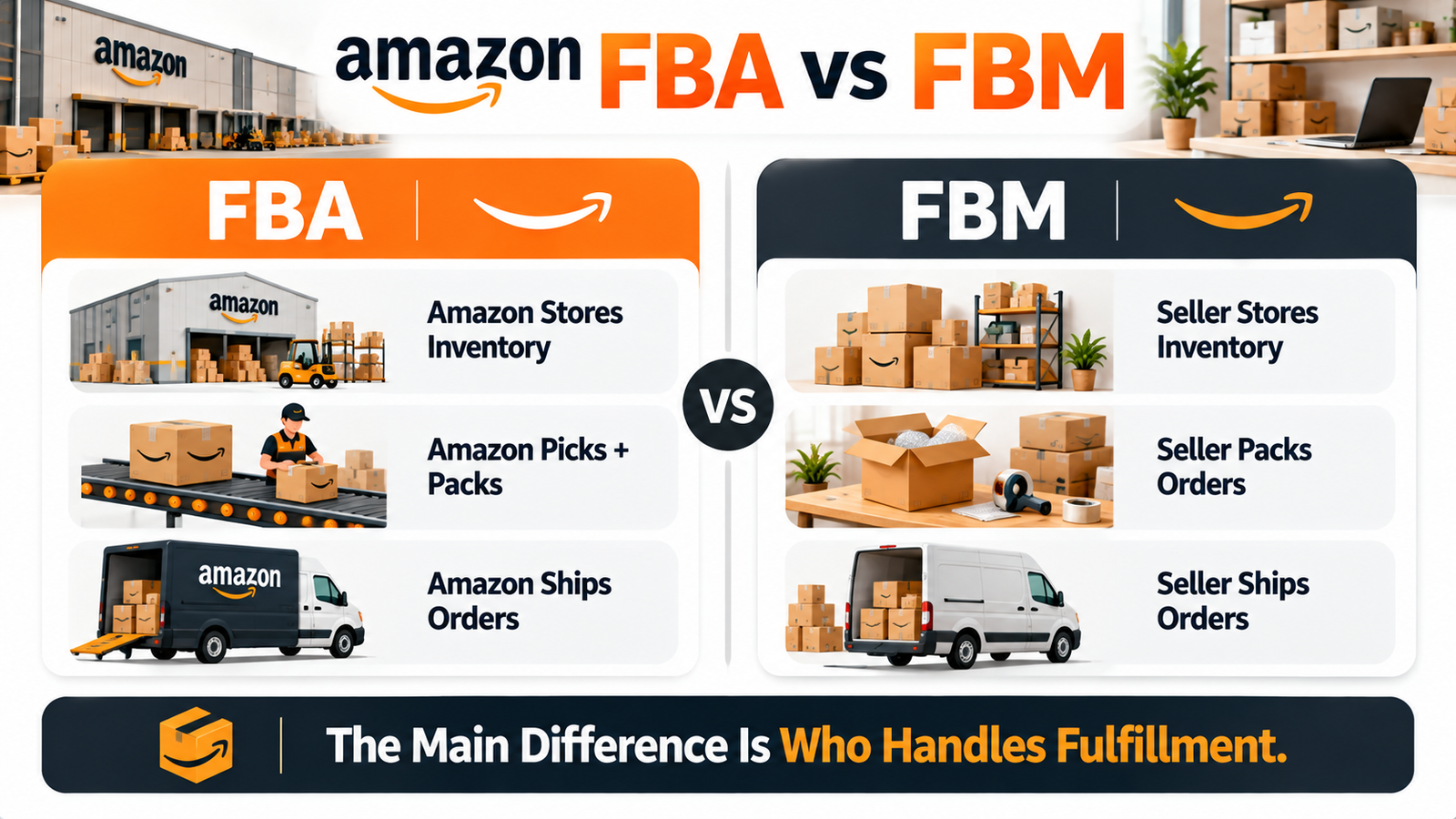 FBA vs FBM mainly changes who handles fulfillment.
FBA
Amazon FBA means Fulfillment by Amazon.
You send eligible stock into Amazon’s fulfillment network. When a customer orders, Amazon can store, pick, pack, ship, handle relevant customer service, and process returns for those orders.
Amazon’s current FBA documentation confirms this basic workflow. See Amazon’s official FBA guide.
FBM
Amazon FBM means Fulfilled by Merchant.
With this model, the seller stores inventory and is responsible for shipping orders under Amazon’s merchant-fulfilled requirements.
Amazon describes both as valid Amazon fulfillment options, and sellers can use one or combine them where appropriate.
For businesses exploring inventory models more broadly, HiSellIt’s guide on how to sell on Amazon without inventory explains some of the alternative approaches.
How Payments and Payouts Work in Seller Central
Amazon Seller Central payments can be reviewed through Finance and the Payments Dashboard.
The Amazon Finance dashboard gives a broader view of business economics, while the Amazon Payments dashboard provides more detailed transaction-level information.
Amazon seller payments can include product charges, refunds, fees, adjustments, and other financial activity.
Amazon payouts are the funds Amazon disburses according to the seller’s applicable payment cycle and account status.
If you are asking how do I check Amazon seller payments, start with Finance, then move into Payments for more detail.
Amazon’s Payments reports currently include account summaries, transaction-level credits, fees, adjustments, and downloadable transaction reports.
Amazon payment reports are useful for reconciliation, but do not confuse Amazon revenue minus marketplace fees with profit. Product cost, shipping, advertising, returns, software, and other operating expenses still matter.
What Is Amazon Account Health?
Amazon Account Health is one of the areas new sellers should take seriously from the beginning.
The Amazon Account Health dashboard helps sellers monitor policy compliance and seller-performance issues. Amazon describes it as a place to track performance metrics and compliance with policies required to sell in its store.
This is different from sales performance.
A store can be producing strong revenue while still having Amazon seller performance problems.
For merchant-fulfilled sellers, Amazon currently highlights metrics such as Order Defect Rate, Late Shipment Rate, Pre-fulfillment Cancellation Rate, and Valid Tracking Rate. Amazon Account Health can also surface Amazon policy compliance issues and violations that need action.
The important point is not to memorize old benchmark percentages from blog posts. Use the live Amazon Account Health dashboard for the current status of your own account.
If you are wondering where can I see Amazon account health, check the account-performance area available through Seller Central and respond promptly to policy or service issues.
What Can Sellers Manage in Marketing and Advertising?
Amazon marketing tools can help sellers create promotions, discounts, and other customer-facing offers.
Amazon Seller Central advertising covers paid visibility tools that may include Amazon Sponsored Products and other advertising formats depending on seller eligibility, marketplace, and brand status.
Amazon promotions and Amazon discounts are not the same thing as paid Amazon advertising.
The first changes the offer or incentive. The second uses advertising campaigns to increase visibility.
For a beginner, that distinction is enough. This is not the stage to turn every Seller Central feature into a PPC strategy.
What Reports Are Available in Seller Central?
Amazon Seller Central reports are spread across several operational areas because different reports answer different questions.
Sales and Business Reports
Amazon business reports and Amazon sales reports help sellers understand sales activity, units, traffic, and business performance.
Inventory Reports
Amazon inventory reports can help with stock, inventory movement, fulfillment, and other inventory-related questions.
Payment Reports
Amazon payment reports help sellers review transactions, refunds, fees, adjustments, settlements, and disbursement information.
Fulfillment and Operational Reports
FBA and operational reporting can provide deeper information about inventory, shipments, returns, and fulfillment.
The exact Amazon seller reports available can depend on the account, marketplace, fulfillment method, and permissions.
For Amazon seller analytics, the best beginner approach is to start with one question. If you want to know what sold, use sales reporting. If you want to know where money went, use payment reporting. If you want to understand stock, use inventory reporting.
What Is the Action Center?
The Amazon Seller Central Action Center is designed to surface issues that require timely attention.
That can include account tasks, operational problems, Amazon seller notifications, or other actions Amazon wants the seller to review.
The redesigned Seller Central experience places the Amazon Action Center across workspaces so sellers do not have to hunt through every section for urgent items.
For a new Amazon seller, this makes it one of the first places worth checking each day.
What Should New Sellers Check in Seller Central?
 The following Amazon seller routine is a practical suggestion, not an official Amazon-required schedule.
Daily
Check:
- Amazon Seller Central Action Center
- Amazon Seller Central orders
- urgent Amazon Account Health issues
- customer or service problems
- critical inventory warnings
These are sensible Amazon Seller Central daily tasks and make a practical Amazon seller daily checklist.
Several Times Per Week
Review Amazon Seller Central inventory, Amazon inventory management, listing status, shipment progress, returns, and advertising issues if campaigns are running.
Weekly
Review the Amazon sales dashboard, Amazon business reports, account-health trends, advertising performance, and inventory movement.
Monthly
Review Amazon payouts, Amazon payment reports, broader inventory trends, fees, listing issues, and longer-term Amazon seller metrics.
If you are wondering what to check in Amazon Seller Central or what should a new Amazon seller check daily, start with anything that can affect a current customer, order, policy issue, or stock problem.
Common Beginner Mistakes
One common mistake is watching sales while ignoring account health.
Another is checking inventory only after a product has already gone out of stock.
Beginners also confuse FBA and FBM responsibilities, overlook Action Center tasks, miss returns or order problems, and look at revenue without reviewing fees.
Changing listings too frequently can make performance harder to judge. Advertising also cannot automatically fix a weak offer or an operational problem.
For Amazon Marketplace for beginners, learn the basic Amazon seller tools first rather than trying to master every report.
If you later want to understand how outside operational support can fit into a growing account, HiSellIt’s Amazon Store Automation Services guide provides additional context. If you are still at the launch stage, its Amazon Store Launch Services guide covers that earlier phase.
Conclusion
Amazon Seller Central becomes much easier once you treat it as a collection of workspaces rather than one giant dashboard.
For a new Amazon seller, focus first on products, inventory, orders, payments, Amazon Account Health, urgent tasks, and basic reports. This Amazon Seller Central guide is meant to give you that map before you move into advanced advertising, forecasting, or automation.
Once Amazon Seller Central explained in this way starts to feel familiar, the next step is learning how listing, inventory, advertising, and performance data can support better marketplace decisions.
If wholesale FBA is the model you are considering later, HiSellIt’s Amazon Wholesale FBA services provides more detail on that specific operating model.
Frequently Asked Questions
Q. How Does Amazon Seller Central Work?
How does Amazon Seller Central work? It organizes the main seller functions into workspaces for products, inventory, orders, finance, customers, marketing, and urgent actions. Sellers use those areas to manage their marketplace operations and monitor account performance.
Q. What Is the Amazon Seller Central Dashboard?
What is the Amazon Seller Central dashboard? It is the private Amazon seller account dashboard used to manage products, orders, inventory, payments, advertising, reports, and account-related tasks.
Q. How to Navigate Amazon Seller Central?
How to navigate Amazon Seller Central starts with understanding the main workspaces rather than memorizing every submenu. Use Products for listings, Supply Chain for inventory, Orders for purchases, Finance for payments, and My Business for a quick overview.
Q. How Do I Manage Amazon Inventory?
How do I manage Amazon inventory? Use the Supply Chain and inventory tools to review stock, FBA quantities, shipments, storage information, and relevant Amazon inventory reports.
Q. What Can You Do in Amazon Seller Central?
What can you do in Amazon Seller Central? Sellers can manage listings, inventory, orders, fulfillment, payments, advertising, account health, compliance tasks, and reports from the same general seller environment.
Q. How to Use Amazon Seller Central for Beginners?
How to use Amazon Seller Central for beginners is easiest when you focus first on products, stock, current orders, Finance, Account Health, and urgent tasks. Advanced reporting and advertising can come later.
Q. What Reports Are Available in Seller Central?
What reports are available in Seller Central depends on the seller and marketplace, but common categories include Amazon sales reports, Amazon inventory reports, Amazon payment reports, and fulfillment or operational reporting.
Q. Do I Need FBA to Sell on Amazon?
No. Amazon FBA is optional. Sellers can also use Amazon FBM and manage their own fulfillment, or combine fulfillment methods where their products and business model allow it.


One Comment