
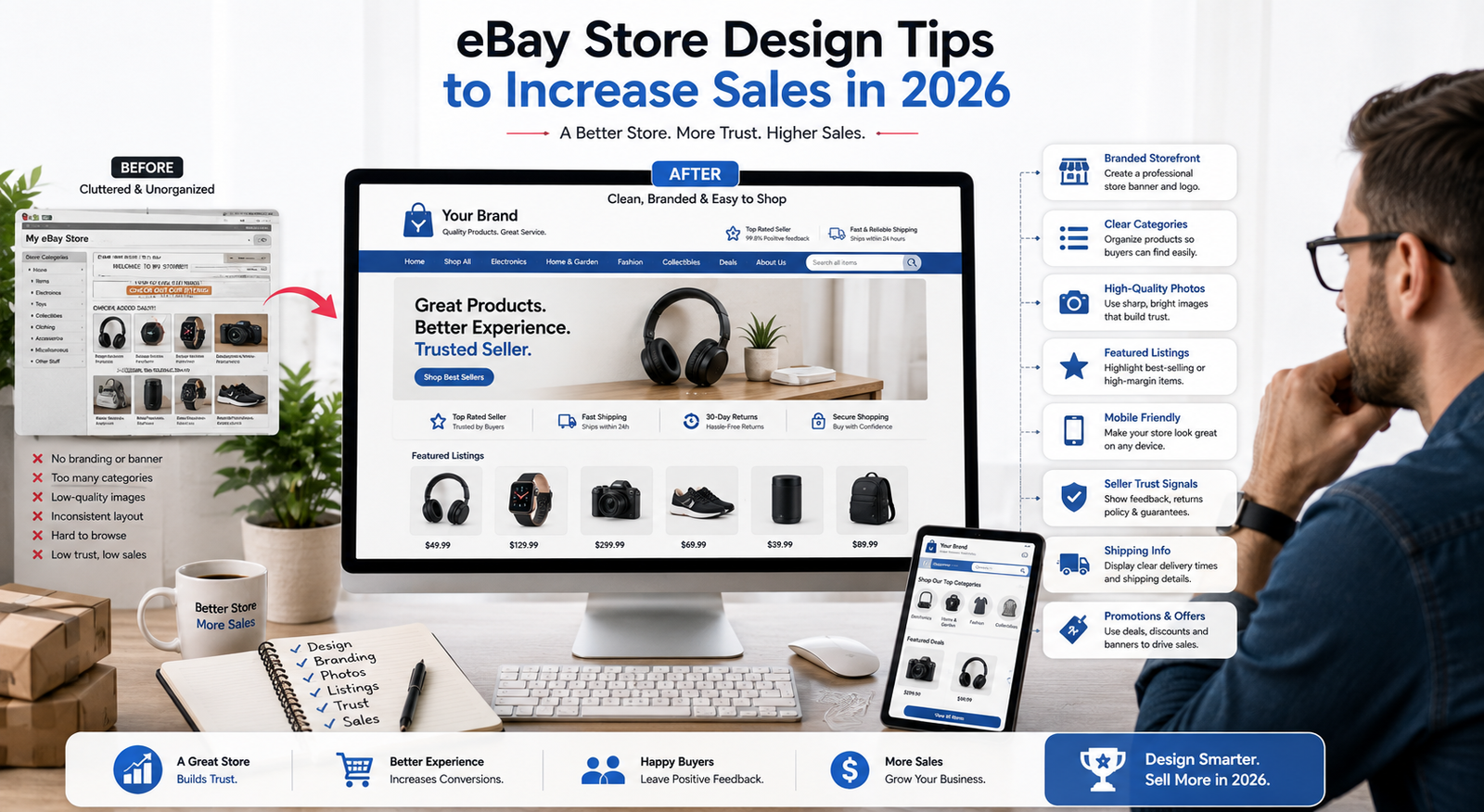
eBay Store Design Tips to Increase Sales in 2026
eBay store design tips are not just about making a storefront look more polished. A well-organized Store can help shoppers understand what you sell, move through your inventory more easily, recognize your brand, and find the products they are interested in without unnecessary friction.
That matters on a marketplace of enormous scale. eBay reported 136 million active buyers worldwide as of June 30, 2026, along with approximately 2.6 billion live listings. It also reported about $15 billion in gross merchandise bought on mobile devices during Q1 2026, which makes clear product presentation and mobile-friendly browsing especially important for sellers.
The good news is that sellers do not need to build a storefront from scratch. eBay Stores support custom logos, billboard images, Store categories, featured listings, an About section, and other tools that can help organize inventory and strengthen branding. This guide covers practical changes you can make to improve your eBay storefront and create a cleaner shopping experience.
Quick Answer: What Are the Best eBay Store Design Tips?
The best eBay store design tips are to use clear branding, organize Store categories logically, feature relevant listings, use strong product images, optimize listings for mobile buyers, make shipping and return information easy to understand, and maintain accurate seller information and feedback. The goal is to make your Store easier to browse and help buyers understand what you sell.
eBay Store Design Elements to Prioritize
| Store Element | What to Improve | Why It Matters |
|---|---|---|
| Logo & Billboard | Use clear, consistent branding that reflects what you sell | Helps buyers recognize and understand your Store |
| Store Categories | Group products using clear, buyer-friendly category names | Makes inventory easier to browse and discover |
| Featured Listings | Highlight relevant, seasonal, popular, or priority products | Directs attention toward important inventory |
| Product Images | Use clear, well-lit, accurate, and consistent photography | Helps buyers evaluate products and condition |
| Mobile Presentation | Check titles, images, categories, and listing information on smaller screens | Supports a clearer experience for mobile shoppers |
| Shipping & Returns | Make costs, delivery expectations, and return terms clear | Reduces uncertainty before purchase |
| Seller Trust | Maintain accurate listings, responsive communication, and strong feedback | Supports buyer confidence in your Store |
Why eBay Store Design Matters More Than You Think
Your eBay Store gives buyers a place to see more of your inventory and get a clearer sense of the business behind the listings. A strong storefront should make it obvious what you sell, help buyers move between relevant product categories, and keep the overall presentation consistent. eBay currently lets Store subscribers customize important storefront elements such as a logo, billboard, About section, Store categories, search, and featured listings. These are the areas worth prioritizing because they directly shape how buyers navigate and understand your Store.
Many sellers underestimate how closely store design and profit are linked. You can have a great product range and competitive prices, but if your storefront doesn’t build trust, you’re losing sales opportunities. A well-structured layout removes friction, makes browsing effortless, and helps guide visitors toward checkout. For detailed guidance on customizing your layout, you can refer to eBay’s official Store Design tools.
Good design also influences buyer retention. When customers enjoy a seamless shopping experience, they’re more likely to bookmark your store and come back for future purchases. Those repeat visits are often where steady growth happens, turning casual shoppers into long-term buyers.
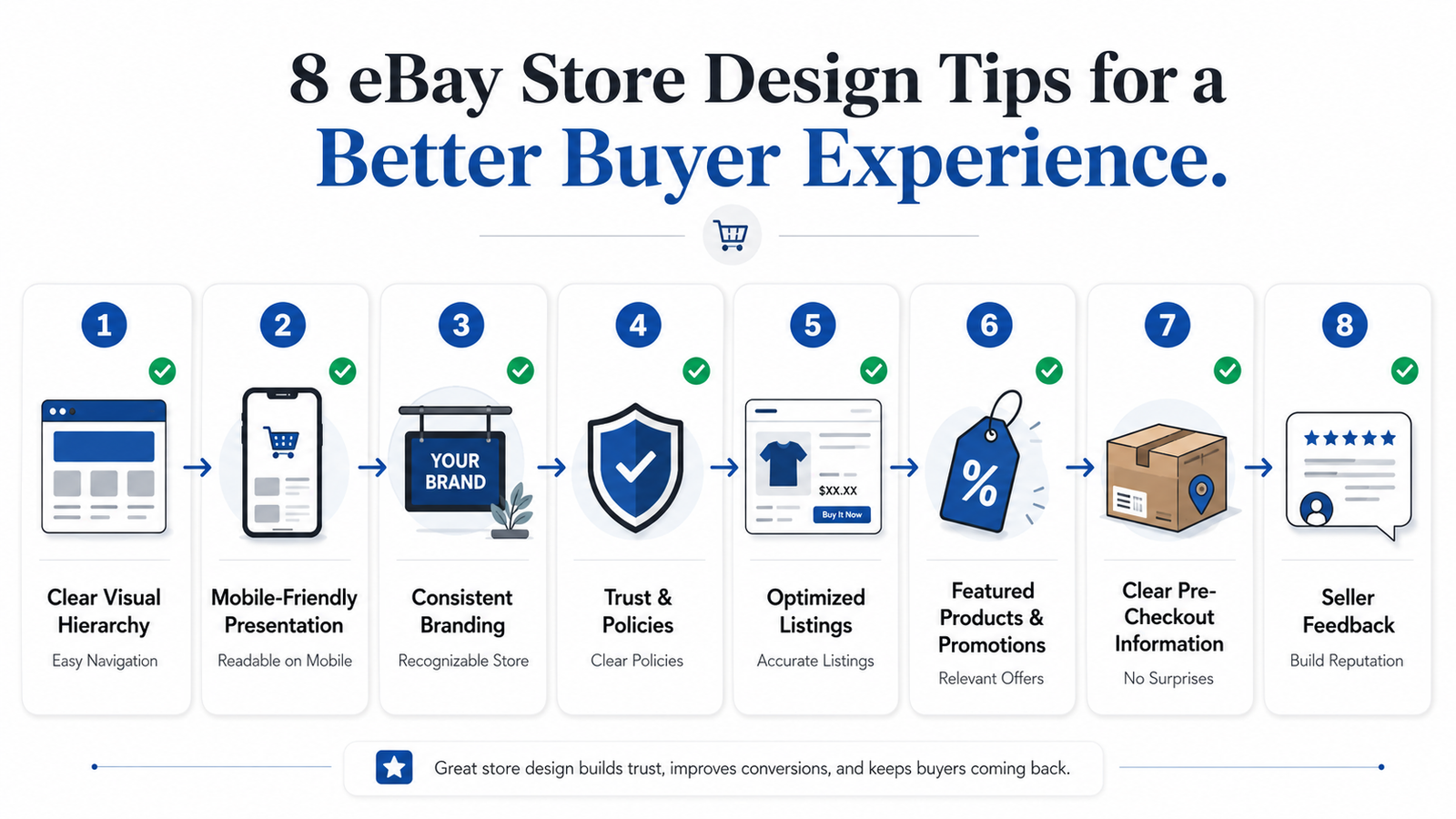
Improving navigation, branding, listings, mobile presentation, promotions, and trust signals can create a clearer eBay Store experience.
1. Create a Clear Visual Hierarchy
Your store header is the first thing visitors notice. Keep it clear and focused, showing what you sell without crowding it with too many categories. A busy header can confuse buyers and drive them away.
Start with the parts of the storefront buyers actually see first. eBay currently recommends using a clear Store logo and billboard to establish your identity. Sellers can also organize inventory into Store categories and feature selected listings on the homepage. eBay supports up to 300 Store categories and up to 24 featured listings, arranged across four rows.
Keep your top-level categories focused on the ways buyers naturally shop your inventory. Avoid unnecessary category layers or vague labels that make products harder to find. For instance, an electronics store might group items by device type, such as phones, tablets, and accessories, instead of scattered subcategories that frustrate shoppers. For guidance on writing effective product descriptions that boost sales, see our complete guide.
Consistent branding is also key. Keep the branding elements you can control consistent. Your logo, billboard, product photography, Store description, and promotional graphics should feel like they belong to the same business. eBay’s own Store guidance recommends using the logo and billboard to reinforce your brand identity.
Sellers who do not already have a billboard graphic can also use eBay’s built-in AI billboard generator, then review or regenerate the result before publishing it.
Product photography deserves special attention because photos help buyers assess exactly what they are purchasing and, for used items, understand the item’s condition. eBay requires at least one qualifying image and recommends using multiple photos where they help buyers make a more informed decision.
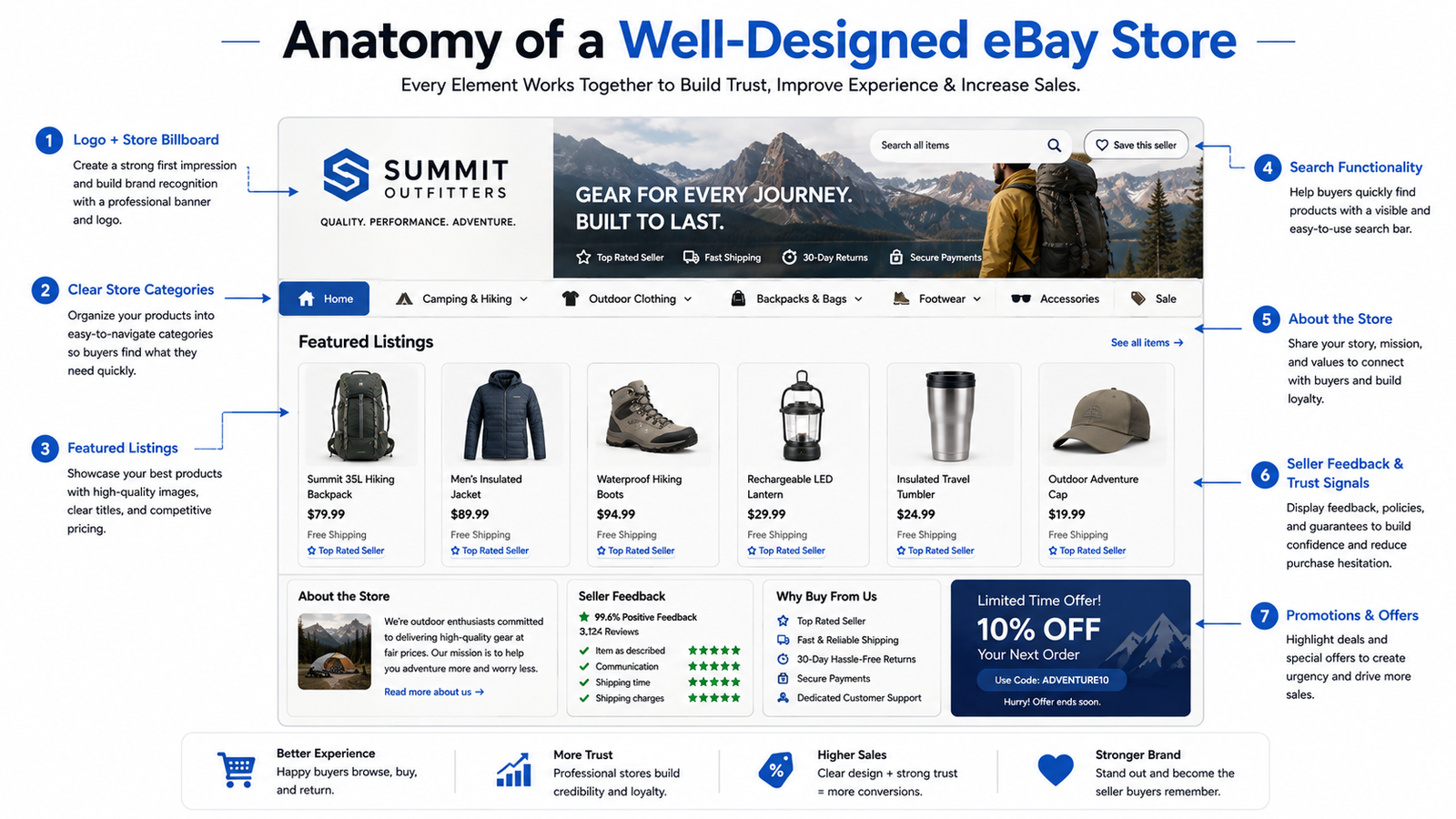
A strong eBay storefront organizes branding, categories, featured listings, store information, and buyer trust signals into a clear browsing experience.
2. Optimize Your Store for Mobile Buyers
Mobile shopping is too important to treat as an afterthought. eBay reported approximately $15 billion in merchandise bought on mobile devices in Q2 2026. eBay also describes its current Stores shopping experience as optimized for mobile web, so sellers should focus on making their own images, categories, titles, and listing content easy to understand on smaller screens.
Review your Store and listings on a phone as well as a desktop. Check whether product images are clear, category names are easy to understand, titles are readable, and important listing information is easy to find without unnecessary scrolling.
Ready to take your eBay business to the next level? Explore our comprehensive e-commerce solutions to streamline your operations.
3. Keep Your Store Branding Clear and Consistent
Use a restrained palette for the branding elements you control. The goal is clarity and consistency, not filling every available space with a different color. Make sure promotional graphics and billboard text are easy to read, and avoid combinations that distract from the products themselves.
Avoid using too many colors or clashing shades, as this creates visual clutter and can overwhelm shoppers. Treat your store like a physical retail space: it should feel inviting, clear, and organized.
4. Craft Compelling Store Policies and Trust Elements
Many sellers overlook the store policies section, but it can significantly boost conversions. Clear and transparent return, shipping, and refund policies build buyer confidence and should be easy to find and understand.
Buyer trust should come from accurate listings, clear shipping and return information, strong seller feedback, responsive communication, and any official eBay seller status you have earned. Avoid adding unofficial badges or claims that could confuse buyers about your status on the platform.
Your About section can also help. Use it to explain what your business sells, what makes your inventory different, and any relevant experience behind the store. eBay specifically provides an About tab for this purpose.
5. Optimize Listings for Buyers and eBay Search
Store design cannot compensate for weak listings. Use clear, searchable titles, choose the correct category, complete relevant item specifics, include useful photos, and write descriptions that accurately explain the product and its condition.
Avoid stuffing descriptions with repetitive keywords. eBay’s Best Match guidance emphasizes complete and accurate listings, relevant categories, strong photos, competitive offers, and good selling practices. Your goal should be to help both eBay and the buyer understand exactly what is being sold.
Titles and product images also play a major role in how clearly buyers understand a listing. Our guide to optimizing eBay titles and images using AI explains how AI can support listing improvements without replacing seller review.
6. Use Featured Listings and Promotions Strategically
Your storefront should not look abandoned. Rotate featured inventory when products, seasons, or promotions change, but avoid changing things simply for the sake of activity.
eBay Store subscribers can feature selected listings on their storefront and use Seller Hub marketing tools for promotions such as sale events, coupons, volume pricing, and shipping offers. Use these tools when they support a genuine offer rather than running permanent discounts that stop feeling meaningful.
Newer sellers should also remember that storefront improvements do not remove account-level selling restrictions. If you are still building your account, our guide to eBay selling limits for new sellers explains how listing and sales limits work and what sellers should consider as they grow.
7. Reduce Friction Before the Buyer Reaches Checkout
Sellers cannot redesign eBay’s checkout flow, but they can remove uncertainty before a buyer gets there. Make pricing, item condition, shipping costs, delivery expectations, return terms, and product details clear before someone commits to a purchase.
Configure shipping options accurately and make sure buyers understand whether shipping is free, fixed-rate, calculated, or eligible for local pickup. The easier it is to understand the total offer, the fewer surprises buyers face when they reach eBay’s checkout.
8. Use eBay’s Existing Trust and Feedback Signals
Buyers already have access to seller feedback and ratings on eBay, so the best way to strengthen social proof is to earn consistently positive feedback rather than manually adding testimonial graphics to your storefront.
Accurate descriptions, good communication, reliable shipping, and effective issue resolution all contribute to the reputation buyers see when evaluating your store. For eligible catalog products, eBay may also display product reviews directly on listings.
Quick Win Recommendations
Begin by reviewing your Store header and navigation. Make sure a new visitor can quickly understand what you sell and move into the product categories that matter to them.
Next, audit your product photography. Ensure images are clear, well-lit, and consistent, as improving them is a simple change that can yield significant results. Finally, review your store policies and trust signals, making sure they are visible and convey reliability to shoppers.
Once your storefront and listings are organized, the next challenge is often managing a growing operation efficiently. Our eBay automation growth timeline guide explains how automation can fit into different stages of an eBay business as order volume and operational demands increase.
Quick Answer: What Should You Improve First on an eBay Store?
Start by reviewing your Store logo and billboard, navigation and categories, featured listings, and product images. Then check how your Store and listings appear on mobile, improve unclear shipping or return information, and make sure your best inventory is easy for buyers to discover.
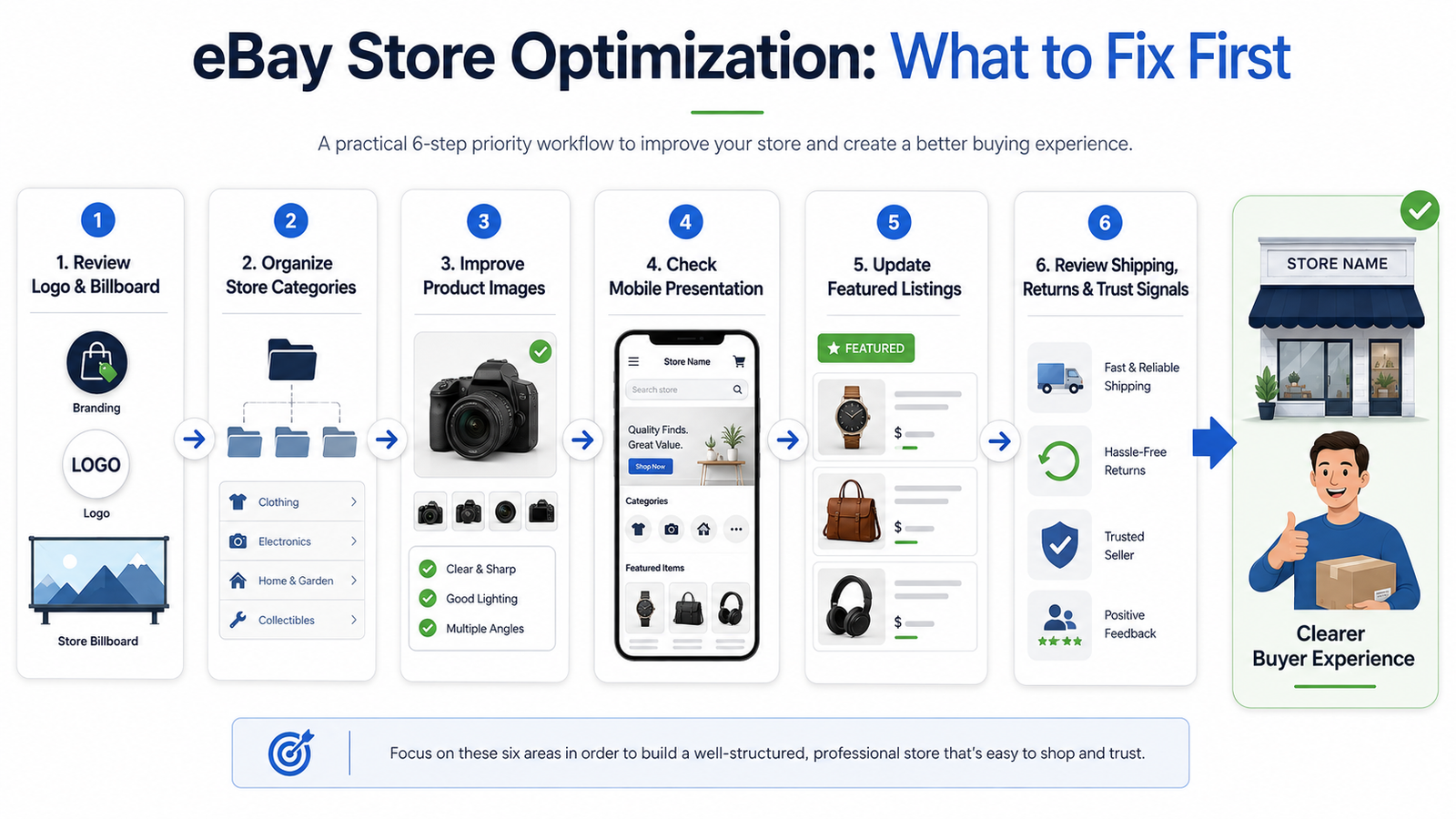
Start with the storefront elements buyers interact with most, then review listings, mobile presentation, policies, and trust signals.
Conclusion
Improving your eBay store design is about more than just appearance. Every detail from navigation and mobile optimization to product images and clear descriptions, affects whether visitors stay, trust your store, and make a purchase.
Improvements such as clearer Store categories, stronger product photography, consistent branding, useful featured listings, and transparent shipping and return information can make your Store easier for buyers to navigate and understand.
If you want help improving your eBay operation beyond storefront design, explore our eBay automation services for support with store management, operations, automation, and growth.
FAQ
How much does it cost to improve my eBay store design?
Many eBay Store design improvements can be made using tools already available with an eligible Store subscription, including logo and billboard customization, Store categories, featured listings, and the About section. Additional costs depend on whether you hire a designer, photographer, or other specialist.
How long does it take to see results from store design changes?
There is no fixed timeline. Changes to navigation, branding, featured inventory, or product images are visible once published, but their impact on browsing and sales depends on traffic, inventory, pricing, competition, and the specific changes you make. Track performance over time rather than expecting results within a set number of weeks.
Does eBay store design affect search rankings within the platform?
Store appearance itself is not a direct shortcut to higher eBay search rankings. eBay’s Best Match guidance focuses on factors such as accurate and complete listings, relevant categories, high-quality photos, competitive offers, shipping, and good seller practices. A better Store can improve the buyer experience, but listing optimization should remain a separate priority.
What’s the most important element of eBay store design?
There is no single element that matters for every store. Start with clear navigation, a recognizable logo and billboard, organized categories, strong product photography, and featured listings that make your best or most relevant inventory easy to discover.
Can I use templates for my eBay store, or should I custom-design?
Most sellers can build a professional storefront using eBay’s native customization tools for logos, billboards, categories, featured listings, and the About section. Custom design work may be useful for more advanced branding, but it is not required to create a clear and professional eBay Store. eBay’s current storefront experience is optimized for mobile web.
Not sure where your eBay store needs the most improvement? Contact the HiSellIt team to discuss your current setup and growth goals.