
Best Tools for Automating Order Fulfillment and Customer Support Across Platforms in 2026
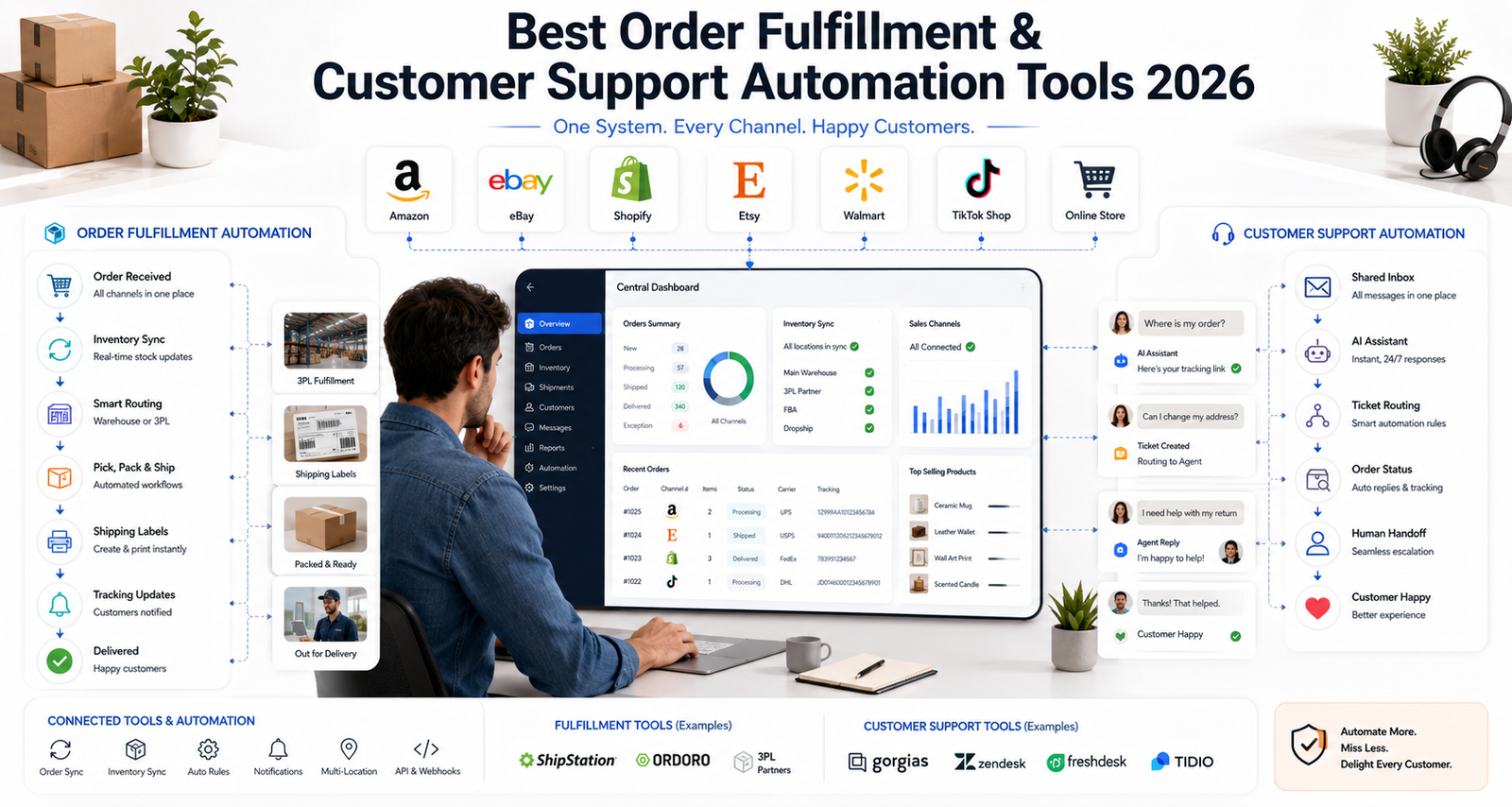
The best tools for automating order fulfillment and customer support across platforms have become increasingly valuable for online sellers who want to scale without becoming overwhelmed by repetitive operational tasks. E-commerce businesses now sell across multiple channels such as Amazon, eBay, Shopify, Etsy, Walmart, and TikTok Shop, which makes coordinating orders, inventory, shipping, tracking, and customer messages increasingly complex.
Automation can reduce manual work by connecting these systems and helping information move between them more efficiently. For example, ShipStation currently supports 200+ store and marketplace integrations and works across a network that includes more than 200 carriers, showing just how interconnected modern multichannel fulfillment has become.
Manual order processing can consume time that could otherwise be spent growing your business. Customer emails can pile up while you’re shipping packages, inventory counts may fall out of sync across platforms, and tracking updates can become difficult to manage manually as order volume rises.
The good news is that you don’t need to automate your entire business at once. In this guide, we’ll walk through some of the most useful e-commerce automation tools in 2026 for order fulfillment and customer support, along with practical ways to automate repetitive tasks without losing the human touch customers still need.
Quick Answer: What Are the Best Order Fulfillment and Customer Support Automation Tools in 2026?
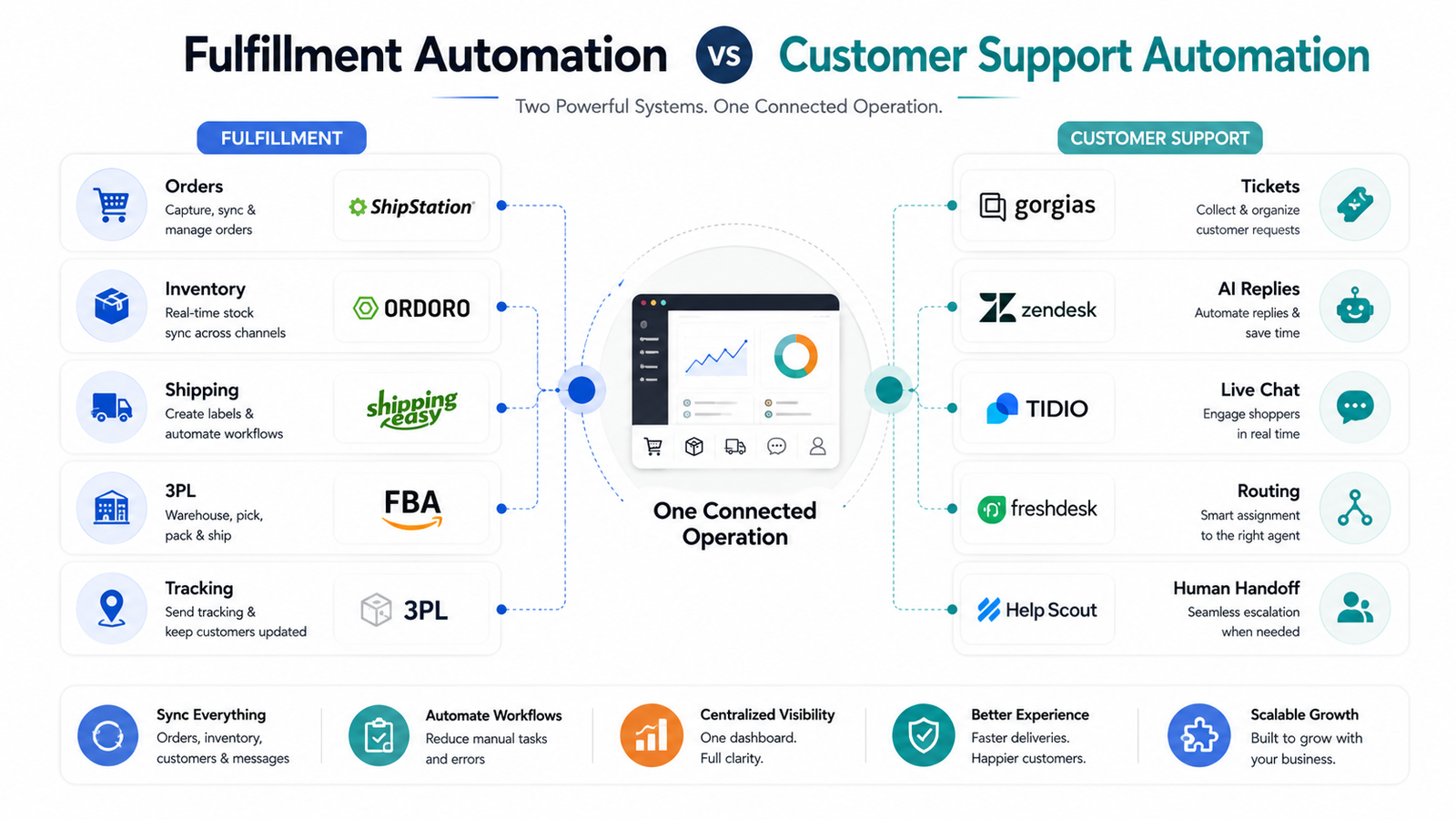
The best tools depend on what your business needs to automate. ShipStation, Ordoro, and ShippingEasy can support shipping, order management, and inventory workflows, while Amazon FBA and third-party logistics providers can handle physical fulfillment. For customer support, tools such as Zendesk, Gorgias, Freshdesk, Tidio, and Help Scout can automate ticket routing, routine questions, order-status requests, and other repetitive workflows. The right combination depends on your sales channels, fulfillment model, order volume, integrations, support needs, and operating costs.
Why E-Commerce Automation Matters More Than Ever
Automation has shifted from being a convenience to becoming an important operational tool for many growing online businesses. Customers expect accurate orders, useful tracking information, responsive support, and reliable shipping. At the same time, sellers may be managing several marketplaces and storefronts at once.
If you’re still manually copying orders from Amazon into shipping software, checking stock separately across marketplaces, or answering the same tracking question repeatedly, you’re spending time on tasks that can often be streamlined.
Multi-channel selling brings significant opportunities. However, it can also create operational complexity when the right systems are not in place. Each platform may have different requirements, shipping rules, inventory systems, and customer expectations. Keeping everything synchronized manually becomes increasingly difficult as you grow.
Furthermore, mistakes can become costly. A wrong address, inventory mismatch, missed customer message, or delayed tracking update can lead to refunds, support requests, and poor customer experiences.
Automation tools can reduce the risk of these problems by helping synchronize information, route repetitive tasks, update inventory, and organize customer conversations. They do not eliminate every mistake, but they can make a growing operation easier to manage.
Understanding Order Fulfillment Automation for Multi-Channel Sellers
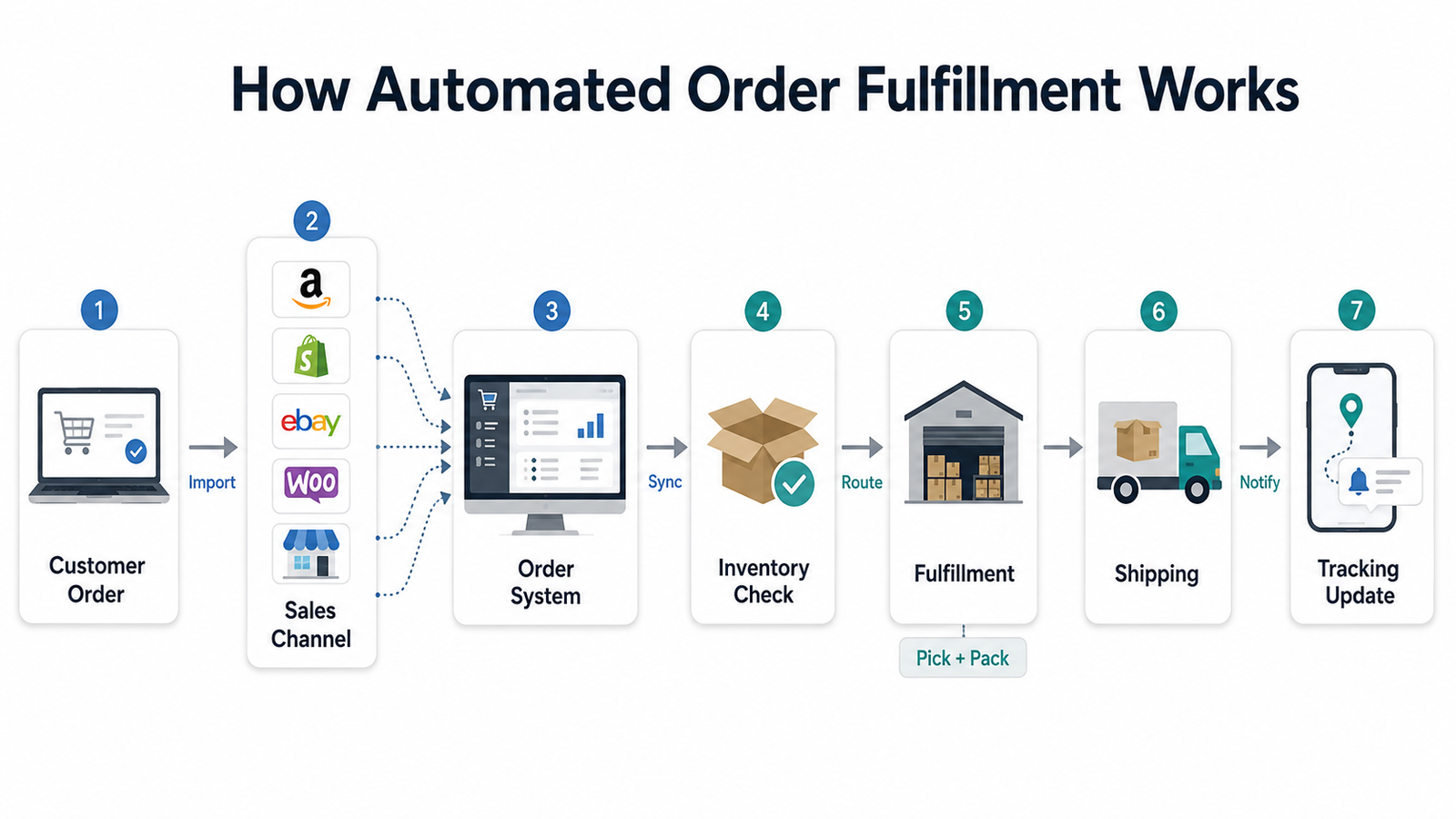
Order fulfillment automation connects your sales channels to your shipping, order management, inventory, warehouse, or fulfillment systems.
When a customer places an order on a connected platform, the automation system can import the order, check relevant inventory information, route it to the appropriate fulfillment workflow, generate shipping documentation, and return tracking information to the sales channel.
Depending on your setup, many of these steps can happen automatically, although exceptions still require human oversight.
The best order fulfillment automation tools can connect with platforms such as Amazon, eBay, Shopify, Etsy, Walmart, TikTok Shop, and other ecommerce channels. This means you can manage orders from a central system rather than repeatedly logging into separate accounts.
Inventory synchronization can also help reduce the risk of overselling by updating available quantities across supported channels when inventory changes. Sellers should still monitor synchronization delays, returns, bundles, cancelled orders, and other inventory exceptions.
Shipping automation is another major benefit. Tools such as ShipStation and ShippingEasy can import orders, compare available shipping services, create labels, produce shipping documents, and return tracking information to connected stores.
ShipStation’s current platform, for example, supports marketplaces including Amazon, eBay, Etsy, Walmart and TikTok Shop, alongside storefronts such as Shopify, WooCommerce and BigCommerce. See ShipStation’s current integrations
For small businesses, this level of automation can make higher order volumes more manageable without requiring every repetitive fulfillment step to be completed manually.
If you’re ready to explore how automation can support your operations, HiSellIt offers ecommerce strategy and growth support for online sellers looking to build more efficient systems.
 Top Tools for Automating Order Fulfillment in 2026
Several powerful tools remain relevant in the order fulfillment automation space in 2026. Each has different strengths depending on your business size, fulfillment model, marketplaces, and operational requirements.
Order Fulfillment Automation Tools Compared
| Tool | Best For | Main Capabilities |
|---|---|---|
| ShipStation | Multichannel shipping | Order imports, shipping labels, carrier comparison, tracking, automation rules |
| Ordoro | Inventory + order management | Inventory sync, shipping, dropshipping, purchasing, order routing |
| ShippingEasy | Small and growing sellers | Shipping automation, order imports, carrier rates, tracking |
| Amazon FBA | Amazon sellers outsourcing fulfillment | Storage, picking, packing, shipping, customer service, returns |
| ShipBob / ShipMonk | Brands outsourcing logistics | Warehousing, inventory storage, pick-pack-ship, multichannel fulfillment |
ShipStation
ShipStation remains a popular option among multi-channel sellers.
Its platform now supports more than 200 store and marketplace integrations, alongside over 200 carriers and a wider ecosystem of hundreds of integrations. Sellers can automatically import orders, compare shipping services, print labels in batches, manage tracking, and configure automation rules.
You can also build rules around factors such as destination, shipping service, order details, or other conditions supported by the platform.
This makes ShipStation particularly useful for businesses that still handle their own physical packing but want to automate much of the shipping administration.
Ordoro
Ordoro focuses on inventory, order management, shipping, purchasing, and dropshipping workflows.
It can help sellers synchronize inventory across connected channels, route orders to warehouses or dropshipping suppliers, create shipping labels, manage purchase orders, and coordinate multiple fulfillment locations. Ordoro’s current platform integrates with major channels including Amazon, eBay, Shopify, BigCommerce, and other ecommerce systems. Explore Ordoro’s order management platform
This can be particularly useful if you’re selling through several channels and need stronger control over inventory alongside shipping.
ShippingEasy
ShippingEasy remains geared toward smaller and growing ecommerce businesses that want shipping automation without immediately adopting an enterprise logistics platform.
Its current 2026 offering includes a free Starter option for low-volume merchants, while paid plans increase according to monthly shipment volume and feature requirements. Paid plans include functionality such as automatic order imports, shipping automation, branded tracking, reporting, and support for multiple stores and marketplaces. View ShippingEasy’s current plans and features
One correction from older information is that ShippingEasy does not provide unlimited users on every plan. User allowances vary according to the selected plan.
Fulfillment by Amazon
For sellers using Amazon, Fulfillment by Amazon (FBA) can handle much more than shipping-label automation.
With FBA, sellers send eligible inventory into Amazon’s fulfillment network. Amazon stores the products and handles picking, packing, shipping, related customer service, and returns for those orders. Learn how Amazon FBA currently works
Costs depend on factors such as product dimensions, weight, storage requirements, and the services used, so sellers should compare FBA economics with their other fulfillment options rather than assuming it is automatically cheaper or more expensive.
Sellers comparing these expenses in more detail can read our Amazon FBA automation cost breakdown to understand the different costs that can affect an automated Amazon operation.
Third-Party Logistics Providers
3PL providers such as ShipBob and ShipMonk can take physical fulfillment off your plate entirely.
They can store inventory in their warehouses and pick, pack, and ship orders received through connected ecommerce channels.
A 3PL can make sense when warehouse operations are taking too much time, when you need additional fulfillment locations, or when outsourcing logistics better fits your economics. It is not necessary to reach an arbitrary order volume before considering one.
Sellers deciding between different marketplace fulfillment models may also find our comparison of Walmart automation vs Amazon FBA useful when evaluating which approach better fits their inventory, fulfillment, and growth strategy.
Before choosing a provider, compare:
- Storage fees
- Receiving fees
- Pick-and-pack costs
- Returns
- Warehouse locations
- Supported integrations
- Shipping options
- Account support
- Minimum requirements
- Fulfillment-service commitments
The right solution depends on your business model rather than the name of the platform alone.
Customer Support Automation Tools That Actually Help
Customer support can overwhelm even an organized seller. When you’re receiving questions about orders, products, returns, refunds, and shipping across several channels, keeping up manually becomes difficult.
That’s where customer support automation tools can help you respond and organize requests more efficiently without requiring every interaction to be handled from scratch.
Zendesk
Zendesk remains one of the larger customer-service platforms.
It can bring together tickets from channels such as email, messaging, calls, forms, and supported integrations while helping businesses route conversations to appropriate agents.
Zendesk has continued expanding its AI capabilities in 2026. Its current omnichannel routing can assign tickets based on availability and capacity, with additional options such as priority, SLA targets, and skills depending on the plan. Zendesk also introduced AI-based predictive routing in June 2026. Read about Zendesk’s current omnichannel routing
Gorgias
Gorgias was built specifically with ecommerce customer service in mind.
Its helpdesk can connect customer conversations with ecommerce information, while its current AI Agent can answer supported product and order questions and automate certain actions and workflows. Explore Gorgias AI Agent
Support varies by ecommerce platform and feature. For example, Gorgias currently provides its full AI Agent automation functionality primarily for supported Shopify configurations, so sellers should confirm compatibility before purchasing.
Freshdesk
Freshdesk provides ticket management, multichannel support, knowledge-base functionality, workflow automation, and AI capabilities.
Freshdesk Omni has continued expanding its AI Agent functionality throughout 2026, including workflow tools for routing or handling conversations across channels before handing them to human agents when necessary.
It can be worth comparing when you need both traditional helpdesk tools and AI-assisted customer support.
Tidio
Tidio combines live support with its Lyro AI Agent.
Lyro can use approved business knowledge to answer routine questions and can be configured to hand a conversation over to a human agent when the issue requires additional assistance.
For small teams or ecommerce businesses that want conversational support without a larger enterprise helpdesk, Tidio can be worth evaluating.
Help Scout
Help Scout focuses on a simpler shared-inbox approach to customer service.
It combines collaborative inboxes, knowledge-base functionality, workflows, saved replies, reporting, and AI-assisted support features.
For teams that want automation without a highly complex support environment, this simpler workflow can make onboarding and day-to-day customer management easier.
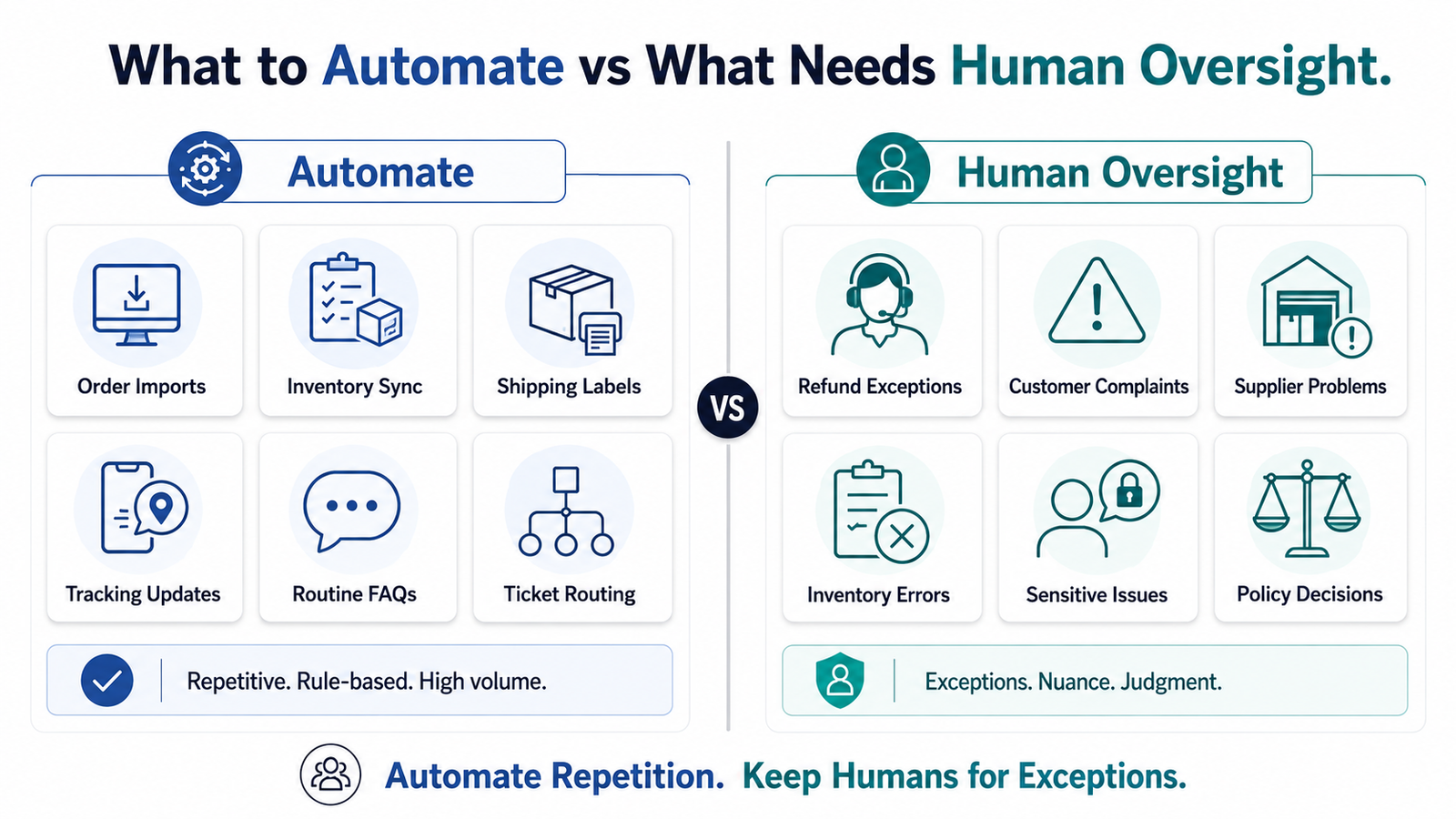
The important point is that AI customer service does not need to replace human support. Routine questions can be automated, while complaints, unusual refunds, payment disputes, sensitive situations, and complex product issues should have a clear human escalation path.
How to Choose the Right Automation Tools for Your Business
Selecting the best tools for automating order fulfillment and customer support across platforms depends on several factors specific to your operation.
Start by evaluating your current pain points. Are you drowning in customer emails? Spending too much time on shipping? Losing track of inventory? Repeatedly answering order-status questions? Your biggest challenge should guide your first automation investment.
Budget matters, but don’t let price be your only consideration. A more expensive tool can still make sense if the operational value it creates exceeds its cost.
Calculate how much time is currently spent on repetitive tasks, how often errors occur, and whether those activities are limiting growth. Then compare those costs with the total subscription, implementation, AI-usage, shipping, or fulfillment charges associated with the software.
Integration capabilities are crucial for multi-channel sellers. Your automation tools need to communicate with your selling platforms and other important systems. Before purchasing, confirm compatibility with:
- Marketplaces
- Ecommerce platforms
- Shipping carriers
- Warehouses or 3PLs
- Accounting software
- CRM systems
- Inventory systems
- Customer-service software
Scalability also matters. What works when you’re shipping a relatively small number of weekly orders may not fit your operation later.
Choose tools that offer appropriate features, capacity, integrations, and pricing as your operation grows. This can reduce the likelihood of needing a difficult software migration later.
User reviews can provide additional context that official marketing pages do not always reveal. Reviews on platforms such as G2 and Capterra can help identify recurring feedback about reliability, customer service, usability, and integrations. However, evaluate current reviews because ecommerce software changes frequently.
If you’re feeling overwhelmed by the options and need personalized guidance, contact the HiSellIt team for support evaluating an ecommerce strategy that fits your business model and growth goals.
Setting Up Your Automated Fulfillment Workflow
Creating an effective automated fulfillment workflow requires careful planning and testing. The initial setup takes some work, but a well-designed workflow can reduce repetitive manual processes afterward.
First, connect your sales channels to your chosen fulfillment tool. This usually involves authorizing integrations or API access so the software can receive the necessary order information.
Don’t rush this step because incorrect connections, SKUs, warehouse mappings, or permissions can create syncing issues later.
Next, configure your automation rules.
Decide which shipping methods or fulfillment locations should apply under different conditions. Instead of using an arbitrary rule such as sending every order over a fixed dollar value through one shipping service, build rules around your actual product weights, destinations, delivery requirements, carrier rates, margins, and customer promises.
Inventory syncing comes next.
Import or confirm your current stock levels and configure synchronization between supported channels. This helps ensure that when inventory changes on one connected platform, appropriate stock information can be reflected elsewhere.
Many systems can also provide low-stock alerts, reorder information, or purchasing workflows. Ordoro, for example, currently combines inventory synchronization with purchasing, warehouse, shipping, and supplier workflows.
Test your workflow before relying on it for normal orders.
Where your platforms allow testing, verify that:
- Orders import correctly
- SKUs map to the correct products
- Inventory updates accurately
- Appropriate shipping services are selected
- Labels contain correct information
- Tracking updates return to the sales channel
- Customer notifications contain accurate information
Train your team on the new system as well.
Even automated processes need human oversight. Make sure your team understands how to handle exceptions, refunds, inventory mismatches, failed integrations, shipping problems, and other issues that do not follow the standard workflow.
Finally, monitor your automation regularly.
Review errors, stuck orders, inventory discrepancies, support escalations, and other exceptions. Automation should be maintained and improved rather than treated as completely “set it and forget it.”
Integrating Customer Support Automation Without Losing the Human Touch
Many sellers worry that automation makes customer service feel robotic and impersonal. However, well-designed customer support automation can improve the customer experience when it handles repetitive tasks and gives support teams more time for complex issues.
Start by automating the most repetitive questions.
Create accurate responses or AI knowledge sources for common queries such as:
- Shipping times
- Return policies
- Product specifications
- Order tracking
- Basic usage questions
Responses should still reflect your brand and current policies rather than sounding like generic scripts.
Use AI agents or chatbots for routine support and triage, not necessarily every conversation.
A well-configured system can determine whether someone wants tracking information, has a basic product question, wants to start a return, or needs a person.
Tidio’s current Lyro system, for example, supports explicit handoff rules so conversations can move to a human agent when necessary.
Set clear expectations about response times. If you use automated after-hours messages, tell customers when they can realistically expect human support. Use your actual operating hours and service standards rather than an arbitrary response-time promise.
Review automated responses regularly. Customer questions change as your products, policies, pricing, and fulfillment arrangements evolve. Make sure your automated information stays current. Nothing frustrates customers more than receiving an automated answer that contradicts your actual policy.
Finally, empower your team to override automation when needed. Sometimes a customer needs special handling that software cannot provide. The goal should be efficiency, not rigidity.
 Common Challenges and How to Overcome Them
Even with the best order fulfillment and customer support automation tools, sellers can encounter obstacles during implementation.
Integration Issues
Integration issues remain one of the most common problems. Sometimes platforms do not synchronize properly, permissions expire, or product data maps incorrectly.
When this happens, check your connection status, API permissions, SKU mapping, and platform documentation. Contact the relevant software provider when an integration issue cannot be resolved internally.
Learning Curves
New software usually requires adjustment time.
Start with basic features and gradually activate more advanced functionality. Don’t try to automate every business process on day one.
Master the core workflows first, then add further automation once they are reliable.
Cost Concerns
Multiple automation tools can create significant recurring costs.
However, compare software costs with the labor and operational problems they may reduce.
Do not assume that every automation tool automatically provides a positive ROI. Evaluate actual savings, capacity, error reduction, customer-service improvements, and subscription costs.
Over-Automation
Over-automation can backfire.
Some sellers become so focused on efficiency that they remove important human touchpoints. This can create frustrating customer experiences, particularly for complaints, unusual refunds, damaged products, or complex situations.
Balance automation with genuine human support where it matters.
Platform Changes
Platform changes can occasionally disrupt integrations.
When Amazon, Shopify, Walmart, TikTok Shop, carriers, or other platforms change APIs, permissions, features, or policies, your connected software may need updates as well.
Stay informed about important changes and monitor your automation rather than assuming integrations will operate identically forever.
Practical Examples of Automated E-Commerce Businesses
Instead of relying on unverifiable “success stories” with fixed revenue, time-saving, or customer-satisfaction percentages, it is more useful to look at realistic examples of how sellers might combine automation tools.
A small jewelry seller operating on Etsy and Amazon, for example, could use ShipStation to centralize shipping and tracking while using Gorgias or another helpdesk to organize customer communications. The seller could automate routine order updates while continuing to personally handle custom-product requests and complex customer questions.
A supplement company selling across several channels might use Ordoro for inventory and order management while working with a 3PL for physical fulfillment. Inventory synchronization can help reduce overselling risk, while supplier and warehouse workflows can be managed from a more centralized system.
A husband-and-wife team running a home-goods business could use Freshdesk, Tidio, or Help Scout to organize customer emails and automate repetitive questions such as order status, shipping policies, and returns. This would allow them to devote more attention to product development and marketing without claiming that every ticket should be resolved automatically.
These examples share a common theme. Each business identifies a specific operational pain point, chooses a targeted automation tool, and implements it systematically.
You don’t need to automate everything overnight. Focus on high-impact repetitive tasks first and expand from there.
Staying Competitive With Automation in 2026 and Beyond
The e-commerce landscape continues to change rapidly, and automation capabilities are evolving alongside it.
Artificial intelligence is transforming customer-support automation particularly quickly.
Modern tools such as Gorgias, Zendesk, Freshdesk, and Tidio now offer AI agents or AI-assisted workflows designed to handle routine conversations, retrieve approved information, route support requests, and escalate cases that require people.
Shipping and fulfillment tools are becoming more interconnected as well.
Modern ecommerce operations can connect marketplaces, storefronts, carriers, warehouses, 3PLs, inventory software, and support systems instead of treating each channel as an isolated business.
Social commerce also continues to expand the range of channels sellers need to manage. Platforms such as TikTok Shop now appear alongside Amazon, Etsy, Walmart, eBay, Shopify, and other established channels in major shipping integrations. ShipStation’s current marketplace integrations, for example, include TikTok Shop alongside these established ecommerce platforms.
If TikTok Shop is becoming part of your multichannel strategy, our guide to TikTok Shop automation tools explains how sellers can streamline areas such as product operations, order workflows, inventory, analytics, and customer management.
Mobile access remains useful as well, allowing sellers and teams to monitor orders, shipments, and customer requests when they are away from a desktop.
The most successful online sellers should view automation as an ongoing process rather than a one-time project. Regularly evaluate whether your tools still fit your sales channels, fulfillment operation, customer needs, and business economics.
The objective isn’t to adopt every new AI or automation feature.
It is to automate the right processes while retaining human oversight wherever judgment, empathy, or problem-solving is required.
Conclusion
The best tools for automating order fulfillment and customer support across platforms in 2026 can make it easier to manage a growing ecommerce operation, but automation should solve genuine operational problems rather than simply add more software.
ShipStation, Ordoro, and ShippingEasy remain useful for sellers trying to streamline shipping, inventory, and order management. Amazon FBA and third-party logistics providers can take physical fulfillment further by storing, packing, and shipping inventory.
On the customer-support side, Zendesk, Gorgias, Freshdesk, Tidio, and Help Scout can help organize conversations and automate repetitive requests while preserving human escalation for more complicated situations.
The right tools depend on the platforms you sell through, the number and type of orders you manage, the complexity of your inventory, your customer-service workload, and your budget.
Start with the tasks consuming the most time or creating the most errors. Automate them carefully, test the workflow, monitor exceptions, and expand only when the system is working reliably.
If you need help deciding which ecommerce systems or strategies make sense for your operation, explore HiSellIt or contact the HiSellIt team for more personalized guidance.
Frequently Asked Questions
Q. What Is Order Fulfillment Automation in E-Commerce?
Order fulfillment automation uses connected software to reduce manual work between order placement and shipment.
Depending on the system, it can automatically import orders from multiple platforms, synchronize inventory, route orders, generate shipping labels, return tracking information, and send fulfillment data between connected systems.
The physical picking, packing, and shipping still needs to be completed either by your own operation or by a fulfillment provider such as FBA or a 3PL.
Q. How Much Does It Cost to Automate Order Fulfillment and Customer Support in 2026?
There is no universal cost.
Pricing varies according to factors such as:
- Order volume
- Number of shipments
- Users
- Connected sales channels
- Inventory requirements
- Customer-support volume
- AI usage
- Warehousing
- Storage
- Fulfillment services
- Integrations
Some providers offer free or low-volume plans, while more advanced solutions charge according to usage or business scale.
For example, ShippingEasy currently offers a free Starter plan for very low-volume sellers, with paid plans increasing according to shipment volume and functionality.
Always check current pricing before choosing a platform because software plans and feature limits can change.
Q. Is Automation Profitable for Small E-Commerce Businesses?
Automation can be profitable for smaller ecommerce businesses, but it is not guaranteed.
Its value depends on whether the time saved, additional capacity, reduced repetitive work, fewer preventable errors, or improved customer experience justify the cost of the software.
Small businesses should generally start with their clearest operational bottleneck rather than buying a large automation stack immediately.
Q. What Tools Automate Both Fulfillment and Customer Support?
Most sellers still use specialized tools for different functions.
ShipStation, Ordoro, ShippingEasy, FBA, and 3PL platforms can help with different parts of fulfillment, while Gorgias, Zendesk, Freshdesk, Tidio, and Help Scout focus more heavily on customer support.
These platforms can sometimes connect through direct integrations, APIs, or other ecommerce systems, but sellers should verify compatibility before purchasing. Choosing specialized tools can work well when each system addresses a specific operational need.
Q. How Does Automation Help Multi-Channel Sellers Manage Inventory?
Inventory automation can synchronize available stock levels across supported sales platforms and locations.
When inventory changes because of an order, return, manual adjustment, or other supported event, the system can update connected channels according to its configuration. This can reduce the risk of overselling, but it does not guarantee perfect inventory accuracy.
Sellers should still monitor:
- Sync delays
- Returns
- Bundles and kits
- Multiple warehouses
- Cancelled orders
- Damaged stock
- Supplier feeds
- Integration failures
Advanced inventory tools can also support low-stock alerts, purchasing, supplier management, or demand planning depending on the platform.