How to Avoid Copyright Claims on YouTube Videos in 2026
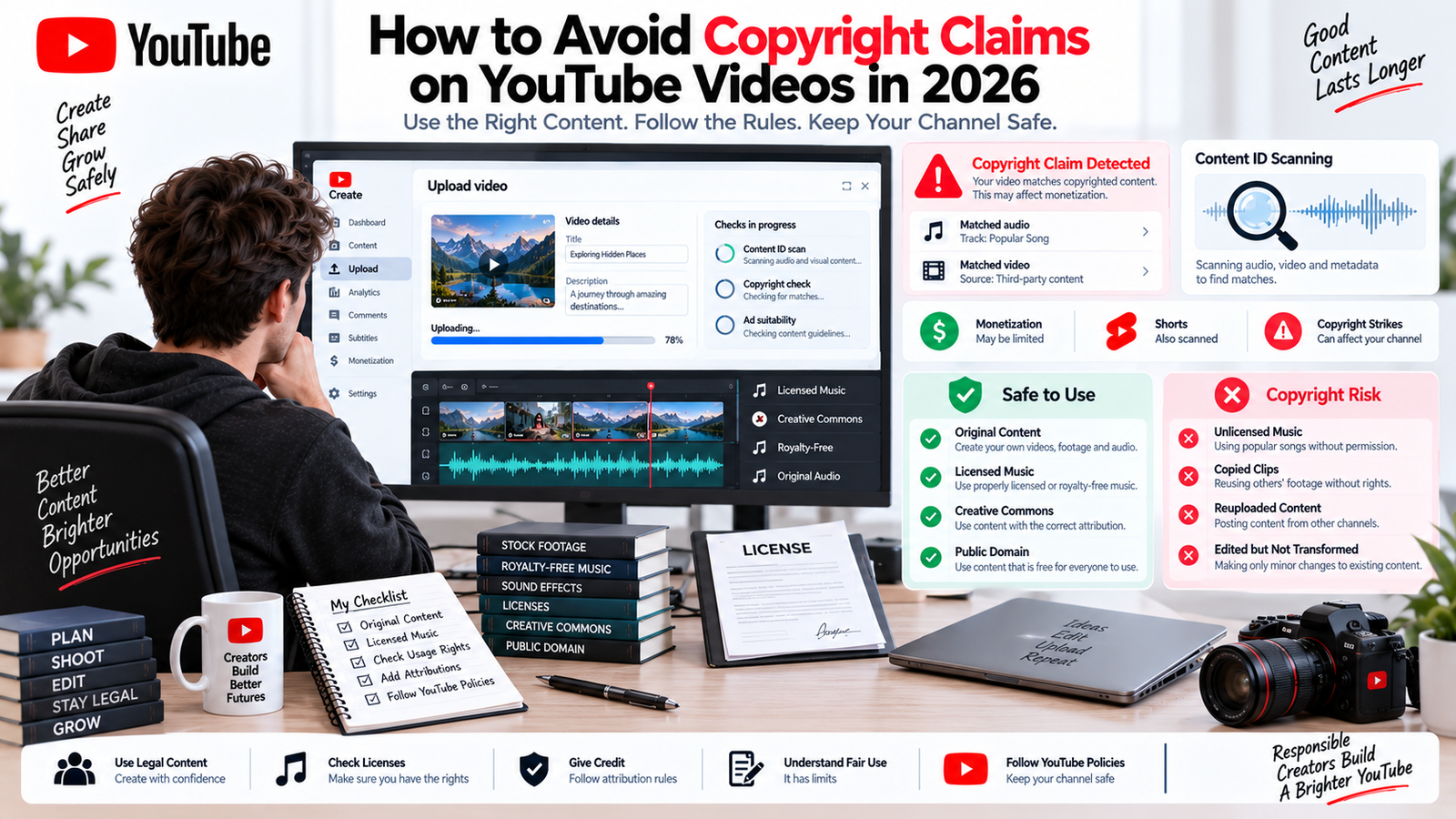
Learning how to avoid copyright claims on YouTube starts with understanding that a Content ID match, a copyright removal request, and a copyright strike are not the same thing. A video may receive a claim because YouTube detects protected audio or footage, while a valid removal request can lead to a YouTube copyright strike and a more serious channel-level consequence.
Creators can also lose revenue or visibility when protected material is claimed, blocked, or removed. YouTube copyright claims can appear even when a creator believes an asset is licensed, which is why YouTube copyright guidance should be treated as part of the production workflow rather than an afterthought.
The safest strategy is to use original material, properly licensed assets, copyright-safe music, and clear rights documentation before publishing.
Quick Answer: How Do You Avoid Copyright Claims on YouTube?
The safest way to avoid copyright claims on YouTube is to use original content or assets you are clearly allowed to use. Choose properly licensed music and footage, use the YouTube Audio Library where appropriate, verify Creative Commons terms, confirm public-domain status, and keep proof of every license or permission. Automated systems can still create claims, so documentation matters even when your use is authorized.
What Is a YouTube Copyright Claim?
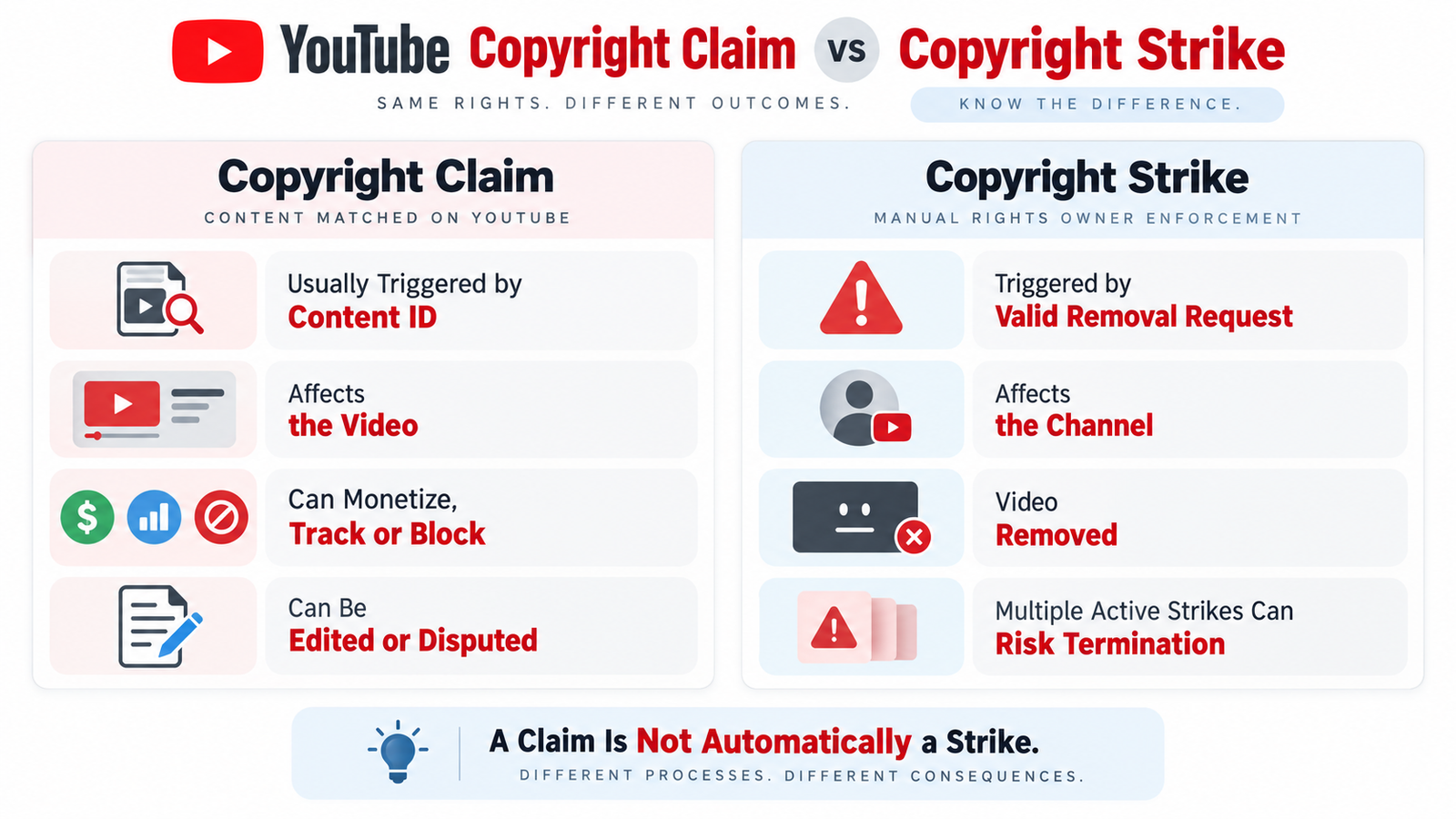
A YouTube copyright claim usually appears when uploaded material matches protected content in YouTube Content ID. Eligible partners with access to YouTube’s Manual Claiming Tool can also create claims manually.
Depending on the rights holder’s policy, a claimed video may be monetized, tracked, or blocked in some or all territories. YouTube copyright claims usually affect the video rather than the whole account.
YouTube explains these outcomes in its official copyright claims guidance.
Copyright Claim vs Copyright Strike: What’s the Difference?
Understanding copyright claim vs copyright strike is essential before responding.
| Factor | Copyright Claim | Copyright Strike |
| Common source | Content ID or eligible manual claim | Valid copyright removal request |
| Main impact | Usually one video | Channel-level consequence |
| Possible result | Monetize, track, or block | Video removal and strike |
| Channel penalty | Usually none by itself | Can affect account standing |
| Resolution | Leave, edit, dispute, or appeal | Copyright School, retraction, or valid counter notification |
A YouTube copyright claim is not the same as a strike. YouTube says a YouTube copyright strike can expire after 90 days when Copyright School is completed and the channel has fewer than three active strikes. Three active strikes in 90 days can put a channel at risk of termination.
If you want to avoid copyright strike on YouTube, first verify your rights before disputing a claim.
 How Does YouTube Content ID Work?
YouTube Content ID compares uploaded audio and video against reference files supplied by eligible rights holders.
The basic process is:
Upload → automated scan → reference match → Content ID claim → rights-holder policy
A Content ID claim can monetize, track, or block a video depending on the policy and video type. These YouTube copyright claims are automated rights-management actions, not legal rulings.
YouTube Content ID cannot decide whether you have fair use, a separate license, or another legal exception. That distinction is central to YouTube copyright rules 2026 and good YouTube copyright education.
How to Avoid Copyright Claims on YouTube Videos
The most reliable way to learn how to avoid copyright claims on YouTube videos is to reduce uncertainty before upload.
1. Create Original Content
Original video, narration, music, photography, graphics, and animation usually carry the lowest copyright risk because you control the source material.
2. Use the YouTube Audio Library
The YouTube Audio Library provides music and sound effects that YouTube describes as copyright-safe. Tracks downloaded from the library should not receive a rights-holder Content ID claim when used according to the applicable terms.
Some tracks require attribution, so check the license information before publishing.
For creators looking for copyright-free music for YouTube, the YouTube Audio Library is one of the strongest first-party options.
3. License Royalty-Free Music Correctly
Royalty-free music for YouTube does not mean the music has no copyright.
Before using royalty-free music for YouTube, verify:
- commercial or monetized use
- permission for YouTube
- channel or account limits
- attribution requirements
- project restrictions
- what happens after a subscription ends
Some third-party libraries also register their tracks with YouTube Content ID. A valid copyright license may therefore be needed to resolve a match even when the use is authorized.
4. Verify Stock Footage Rights
Stock footage may have commercial, editorial, promotional, or redistribution restrictions.
Read the provider’s exact terms rather than assuming every paid asset is automatically cleared for a monetized YouTube video.
A proper copyright license should cover the way you actually plan to use the material.
5. Keep Proof of Rights
Save invoices, receipts, subscription confirmations, permission emails, download records, and the license terms that applied when you obtained the asset.
If YouTube copyright claims appear later, these records can support a dispute.
6. Get Written Copyright Permission
When no public license is available, request copyright permission directly from the owner and keep it in writing.
The permission should clearly cover the intended use where relevant.
Giving credit is not copyright permission.
7. Check Creative Commons Terms
Creative Commons music can be useful, but the exact Creative Commons license matters.
For example, some licenses allow commercial reuse with attribution, while others:
- restrict commercial use
- prohibit adaptations
- require ShareAlike licensing
Creative Commons explains the six major license types in its official Creative Commons license guide.
8. Verify Public Domain Content
Public domain content may be reusable because the underlying material is no longer protected or was never eligible for copyright protection.
However, status can differ by:
- jurisdiction
- edition
- restoration
- translation
- recording
Do not assume an old-looking video, image, or song is automatically public domain.
9. Understand Fair Use
Fair use on YouTube is case-specific.
Commentary, criticism, teaching, research, news reporting, or parody may sometimes qualify, but the answer depends on the facts and applicable law.
10. Use the Checks Page
During upload, YouTube’s Checks page can screen a video for possible copyright issues before publication.
This is one of the most useful YouTube Studio copyright habits for identifying obvious matches before a video goes public.
However, the result is not final. Future manual claims, new reference files, or copyright removal requests may still affect the video.
Safer Source Types for YouTube Videos
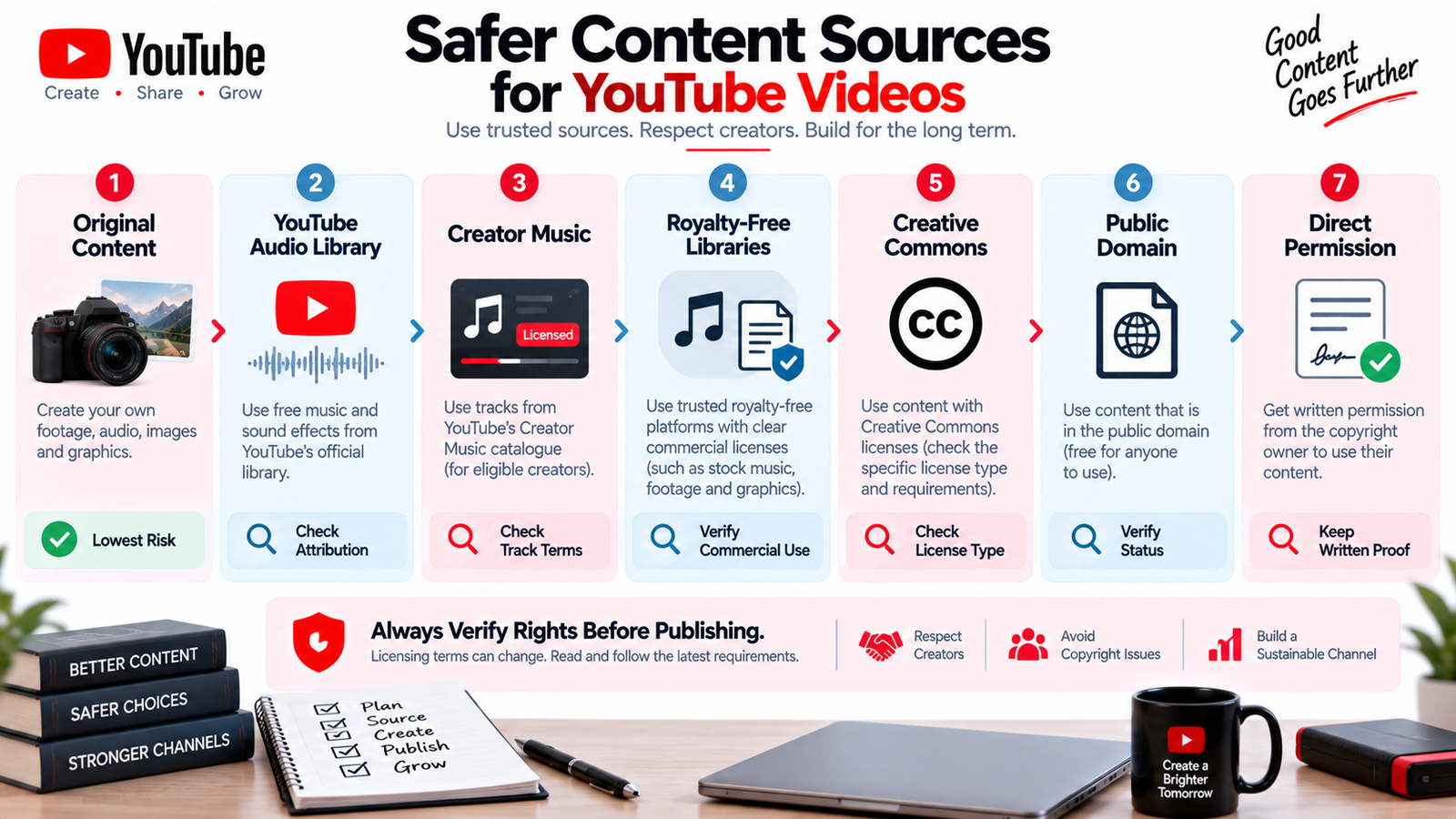
| Source Type | Typical Copyright Risk | What to Verify |
| Your own original material | Lowest | You own every included element |
| YouTube Audio Library | Low | Attribution requirement, if any |
| YouTube Creator Music | Low when terms are followed | Eligibility, usage terms, revenue sharing |
| Third-party royalty-free library | Varies | Commercial use, YouTube rights, channel limits |
| Creative Commons | Varies | Exact license and attribution |
| Public domain | Varies | Genuine status in the relevant jurisdiction |
| Direct permission | Lower | Permission covers the intended use |
| Fair use or fair dealing | Case-specific | Legal factors and local law |
 How to Use Music on YouTube Without Copyright Problems
Copyrighted music on YouTube can involve separate rights in the sound recording and musical composition.
Owning or creating one element does not automatically clear the other.
For music licensing for YouTube, safer options include:
- original music
- the YouTube Audio Library
- YouTube Creator Music where eligible
- correctly licensed Creative Commons music
- third-party libraries with suitable licenses
- direct permission
- verified public-domain music
If you want to use copyrighted music on YouTube legally, confirm that your rights cover the platform, monetization, and intended use.
Creator Music in 2026
YouTube ended new paid Creator Music licensing on August 10, 2026.
Existing paid licenses already applied to videos remain valid until they expire, while Creator Music now focuses on tracks offered at no cost and tracks using revenue-sharing arrangements.
The official YouTube Creator Music guidance currently says the feature remains available to eligible U.S. creators in the YouTube Partner Program, while wider expansion is still pending.
Because music licensing for YouTube can change, always review the current track terms before building a video around a particular song.
Does Fair Use Protect You From Copyright Claims?
Not automatically.
Fair use on YouTube is a legal doctrine, not a YouTube Studio setting.
YouTube Content ID cannot decide whether a use is fair because fair use depends on context.
YouTube’s official fair use guidance explains the four factors generally considered in U.S. law:
- Purpose and character of the use
- Nature of the copyrighted work
- Amount and substantiality used
- Effect on the potential market
The YouTube fair use policy also explains that giving credit, adding disclaimers, using only a short portion, or describing a video as educational does not automatically make the use fair.
A creator can have a genuine fair use on YouTube argument and still receive a Content ID claim. The YouTube fair use policy cannot guarantee that an automated claim will never appear.
Copyright exceptions also differ between countries, so this is general information rather than individualized legal advice.
Common YouTube Copyright Myths
Myth 1: “I Only Used Five or Ten Seconds”
There is no universal safe number of seconds.
Even a short piece of copyrighted music on YouTube can still be protected and detected.
Myth 2: “I Gave the Owner Credit”
Credit does not grant permission unless the relevant license actually allows the use.
Myth 3: “No Copyright Infringement Intended”
A disclaimer does not create legal rights.
Myth 4: “The Video Is Not Monetized”
Non-commercial intent does not automatically eliminate copyright concerns.
Myth 5: “I Changed the Pitch or Speed”
Changing copyrighted music on YouTube does not create legal permission and does not make infringement acceptable.
Myth 6: “It Is Educational, So It Is Fair Use”
Education can be relevant in a fair-use analysis, but it is not an automatic defense.
Myth 7: “Royalty-Free Means Claim-Free”
Royalty-free music for YouTube may still be protected by copyright or registered with Content ID.
The license determines your rights, and YouTube copyright protection does not turn a commercial license into a guarantee against automated matching.
Quick Answer: Does Giving Credit Prevent a Copyright Claim?
No. Giving credit does not automatically give you permission to use another person’s work and does not prevent a Content ID claim. Attribution only works when the applicable license allows the use and requires credit, such as certain Creative Commons licenses.
What to Do If You Receive a Copyright Claim
YouTube copyright claims should be handled according to the actual rights and claim details.
If a YouTube copyright claim appears:
- Review the claimant and exact segment in YouTube Studio.
- Check your copyright license, permission, or ownership records.
- Decide whether to leave the claim, edit the material, or dispute it.
- Save supporting documentation.
YouTube Studio may offer options such as:
- Trim out segment
- Replace song
- Erase song
If all claimed material is removed successfully, the claim can clear automatically.
One important 2026 detail: since June 2025, saved copyright edits made through the YouTube Studio Editor cannot be reverted using the old Revert to original option.
For copyright claim monetization, a claim may redirect or share revenue or block the video.
If revenue strategy is a wider concern, see our guide explaining how much YouTube pays per view.
How to Dispute a YouTube Copyright Claim
Only dispute a YouTube copyright claim when you have a genuine basis.
Possible grounds include:
- you own the necessary rights
- you have a valid license
- the content was misidentified
- a legitimate copyright exception may apply
- the claimant does not own the material
Giving credit, refusing monetization, or writing “no infringement intended” are not sufficient reasons on their own.
YouTube’s official copyright dispute guidance says the claimant generally has up to 30 days to respond to an initial Content ID dispute.
If a reinstated claim is appealed, the claimant generally has 7 days to respond.
Certain blocking claims may also offer an Escalate to Appeal option.
Revenue During a Copyright Claim Dispute
During a YouTube copyright dispute, revenue may be held while the dispute is reviewed.
If you dispute within five days of the original claim, YouTube can hold relevant revenue starting from the first day the claim was placed.
If you dispute after five days, revenue holding generally begins from the date of the dispute.
Do not file a YouTube copyright dispute casually.
If the copyrighted material is unnecessary, it may be simpler to remove copyright claim on YouTube by editing the segment instead.
Can You Remove a Copyright Claim Without Disputing?
Sometimes.
YouTube Studio may provide:
- Trim out segment
- Replace song
- Erase song
These tools can remove copyright claim on YouTube when all claimed material is successfully removed or replaced.
For audio, replacing a claimed track with copyright-free music for YouTube from the Audio Library can be practical.
Preview changes carefully because saved YouTube Studio edits are not reversible through the old restore option.
YouTube Shorts Copyright Rules in 2026
YouTube Shorts copyright rules are especially important for Shorts longer than one minute.
YouTube says a Short over one minute and up to three minutes with an active copyright claim of any type will be:
- blocked globally
- unavailable for playback
- excluded from recommendations
- ineligible for monetization while the claim remains active
The active claim itself does not create a strike.
You can review the current rule in YouTube’s official three-minute Shorts guidance.
For music, creators may be able to use most eligible songs for up to 90 seconds in a three-minute Short, although some tracks are limited to shorter durations.
Music added outside YouTube’s official Shorts tools can still create standard copyright issues.
If reach is the problem rather than copyright compliance, our guide on why YouTube Shorts are not getting views covers that issue separately.
How to Avoid a Copyright Strike on YouTube
To avoid copyright strike on YouTube:
- use content you own or are licensed to use
- verify music and footage rights before upload
- keep proof of every copyright license
- do not assume credit or disclaimers create permission
- understand fair use before relying on it
- do not file weak disputes merely to clear a valid claim
A YouTube copyright strike follows content removal and is more serious than an ordinary claim.
Creators using automation, AI assets, stock footage, or faceless workflows should also separate copyright rules from monetization policy.
Our YouTube AI monetization guide explains that distinction, while YouTube automation services can support a more structured production workflow.
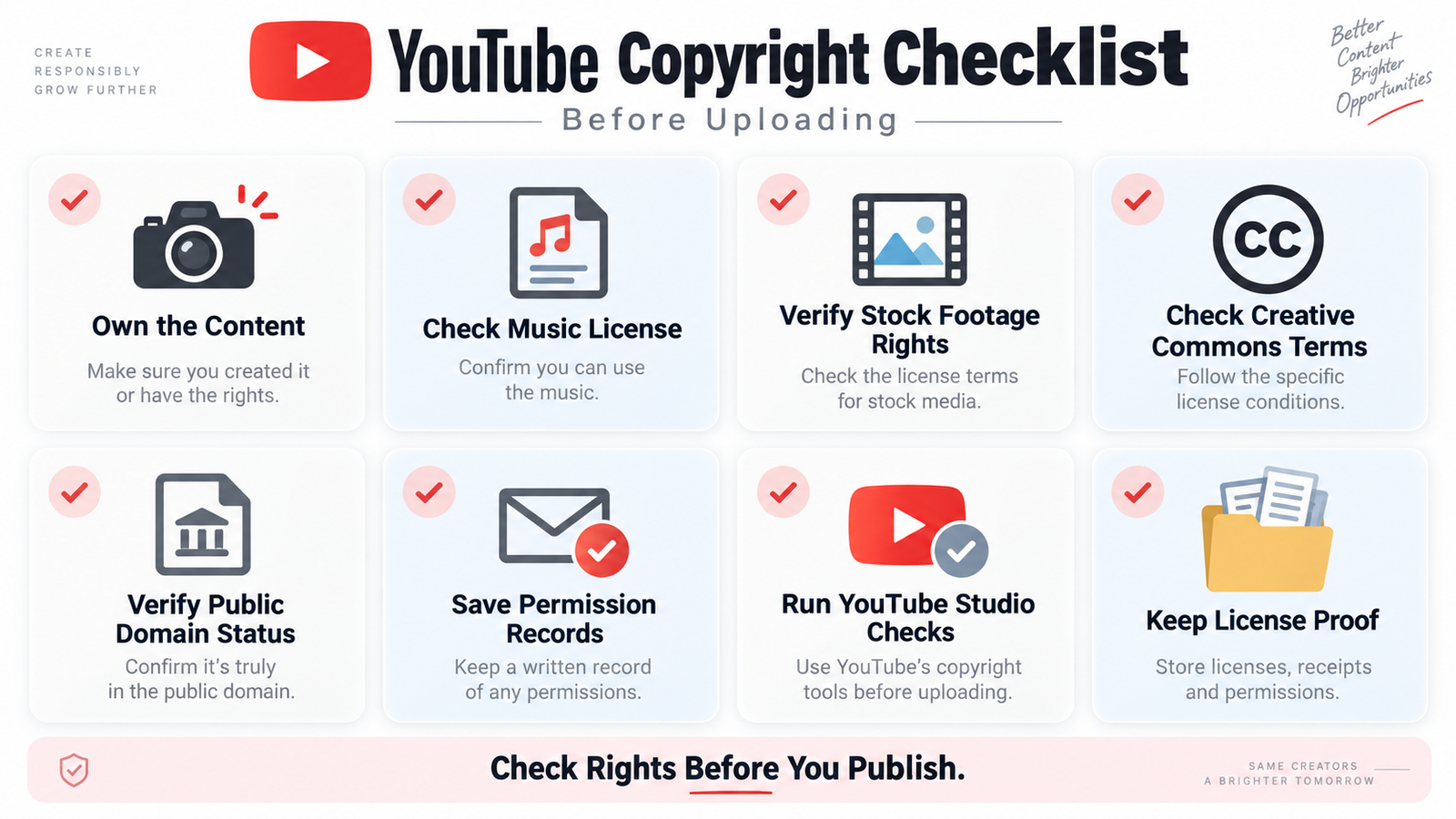
YouTube Copyright Checklist Before Uploading
Before publishing, check:
- Did I create the footage and audio?
- If not, do I have written rights or a valid license?
- Does the music license cover monetized YouTube use?
- Is the Creative Commons license compatible with my intended use?
- Have I verified any public domain content?
- If relying on fair use, have I considered the relevant legal factors?
- Did I choose copyright-safe music where possible?
- Did I run the YouTube Studio copyright Checks page?
- Have I saved proof of rights?
This workflow is one practical way to understand how to avoid copyright claims on YouTube without relying on myths or detection tricks.
 Conclusion
Learning how to avoid copyright claims on YouTube is mainly about rights management.
Use original assets where possible, choose copyright-safe music, understand music licensing for YouTube, verify Creative Commons and public-domain status, and keep evidence of every permission.
The current YouTube copyright rules 2026 also make the difference between a claim and strike important. Reducing YouTube copyright claims starts with better sourcing, while good YouTube copyright practice depends on clear records and careful review.
No process guarantees zero claims, but these habits can significantly reduce avoidable problems.
For help reviewing a larger channel workflow, contact HiSellIt.
Frequently Asked Questions
Q. How Do I Avoid Copyright Claims on YouTube?
Use original material, copyright-safe music, properly licensed footage, verified public-domain works, or material covered by a valid legal exception.
Keep proof of every permission and license.
Q. Can I Use 5 or 10 Seconds of Copyrighted Music on YouTube?
There is no universal safe-seconds rule.
Copyrighted music on YouTube can generate a claim even when only a short portion is used.
Q. Is Royalty-Free Music for YouTube Safe?
It can be, but only when the license covers your intended use.
Royalty-free music for YouTube may still be registered with Content ID, so keep the license documentation.
Q. Does a YouTube Copyright Claim Affect Monetization?
Yes.
A YouTube copyright claim may redirect revenue, share revenue, or block the video depending on the policy. The impact usually applies to the affected video rather than automatically removing monetization from the entire channel.
Q. Is a Copyright Claim the Same as a Copyright Strike?
No.
The copyright claim vs copyright strike distinction is important: a claim usually affects the video, while a valid removal request can create a YouTube copyright strike.
Q. Can YouTube Shorts Get Copyright Claims?
Yes.
YouTube Shorts copyright rules allow claims, and Shorts over one minute with an active claim are blocked globally until the claim is resolved.